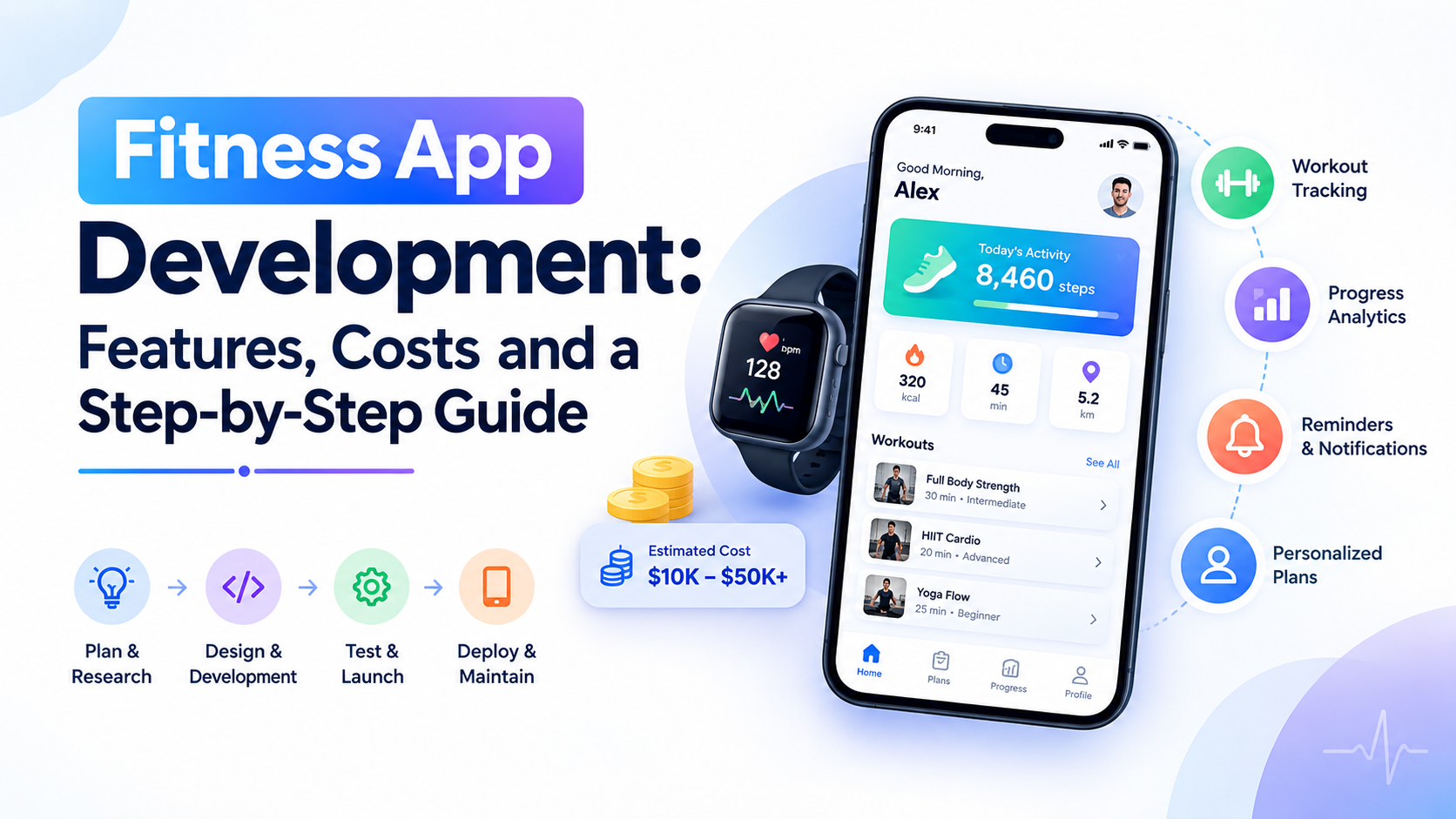
Fitness app development is the process of designing, building and launching a fitness or activity-tracking app. It typically follows six stages, from research and MVP scoping through design, development, testing and launch. Costs range from roughly $30,000 for a simple build to $600,000 or more for a full-featured product.
Fitness app development starts with one clear user need, not a long feature list. The strongest products pick a specific job first, like logging workouts or tracking daily activity. From there, they build a realistic first version, often called a minimum viable product, or MVP.
Wearable integrations, monetization and content operations come later. They matter most once that core experience actually works.
You’ll find the main fitness mobile app types here, plus the features a solid MVP needs. It also walks through the six-stage process from research to launch. Along the way, expect wearable integrations, cost drivers and revenue models too.
Treat this as a planning guide, not a fixed blueprint.
TL;DR
- Start with one core job, like workout logging or activity tracking, instead of building every feature at once.
- A solid MVP covers onboarding, session logging, progress tracking and basic wearable sync, while AI and live coaching can wait.
- Development follows six stages: research, MVP scoping, design, build, testing and launch.
- Native, cross-platform and white-label are the three build paths, each with different cost and ownership trade-offs.
- Budget $25,000 to $600,000 or more, depending on scope, plus recurring costs for hosting, content and support.
- Freemium subscriptions, paid content and coaching services are the most common ways fitness apps make money.
- Plan for privacy, health-data handling and app-store review rules early, not right before launch.
Fitness App Development at a Glance
The right development plan depends on the fitness problem you’re solving. It also depends on the experience you want to deliver. Before you touch features or budgets, settle five decisions.
| Decision area | What to settle first |
| Target user and app type | Pick one primary job: workout training, activity tracking, nutrition logging, coaching or gym management. |
| Core value loop | Define the one action a user repeats, like completing and logging a session. |
| Platform and integrations | Choose iOS, Android or both, and decide which wearables actually matter. |
| Content and operations | Plan who creates, reviews and updates workout content or coaching schedules. |
| Budget and launch | Set a realistic development budget and a phased launch plan. |
Get these five right, and the fitness app development process gets easier from here. Get them wrong, and good code alone won’t save the launch.
What is Fitness App Development?
Fitness app development is the process of designing, building, testing and maintaining fitness software. That software supports exercise, activity or related wellness goals.
It usually includes a mobile client, backend services and a way to manage content behind the scenes. That means workout videos, meal logs or coaching messages, stored and managed through a database and admin panel.
A consumer fitness app isn’t the same as gym-management software, even though the two can overlap. Gym-management tools focus on memberships, check-ins and billing for a facility. Clinical software follows medical workflows and regulatory requirements that a general wellness app doesn’t need to meet.
If you’re planning a custom mobile app for consumer fitness, expect different data handling than either category. The review process looks different too.
Which Type of Fitness App Should You Build?
Choose an app type around one primary user job, not a wish list of features. Most fitness apps fall into a handful of categories, and they often overlap at the edges. The table below breaks each one down by user, core job and what drives its complexity.
| App type | Primary user | Core job | Complexity driver |
| Workout and training | Someone who wants guided sessions | Complete and log a workout | Content volume, video production and instructor licensing |
| Activity tracking | Runners, cyclists and everyday movers | Record and review activity over time | Sensor accuracy, GPS handling and wearable sync |
| Nutrition logging | People tracking food and calories | Log meals quickly and accurately | Food database size, barcode matching and portion accuracy |
| Personal coaching | Clients working with a trainer | Get feedback and stay accountable | Scheduling, messaging and payout logistics |
| Gym and member apps | Members of a specific gym or studio | Book classes, check in and manage membership | Facility integrations and staff-side tools |
| Mind-body and content | People doing yoga, meditation or recovery work | Follow a guided session at their own pace | Content library depth and instructor pipeline |
A few well-known apps illustrate these categories, though none of them define a fixed industry standard. Nike Training Club leans into guided workout content and structured training plans.
Strava is built around activity tracking, routes and community features. MyFitnessPal centers on food logging, including barcode-assisted entry.
These examples show what mature products look like. They’re not a checklist to copy. Your version should solve one job well before it tries to do everything at once.
What Features Should a Fitness App MVP Include?
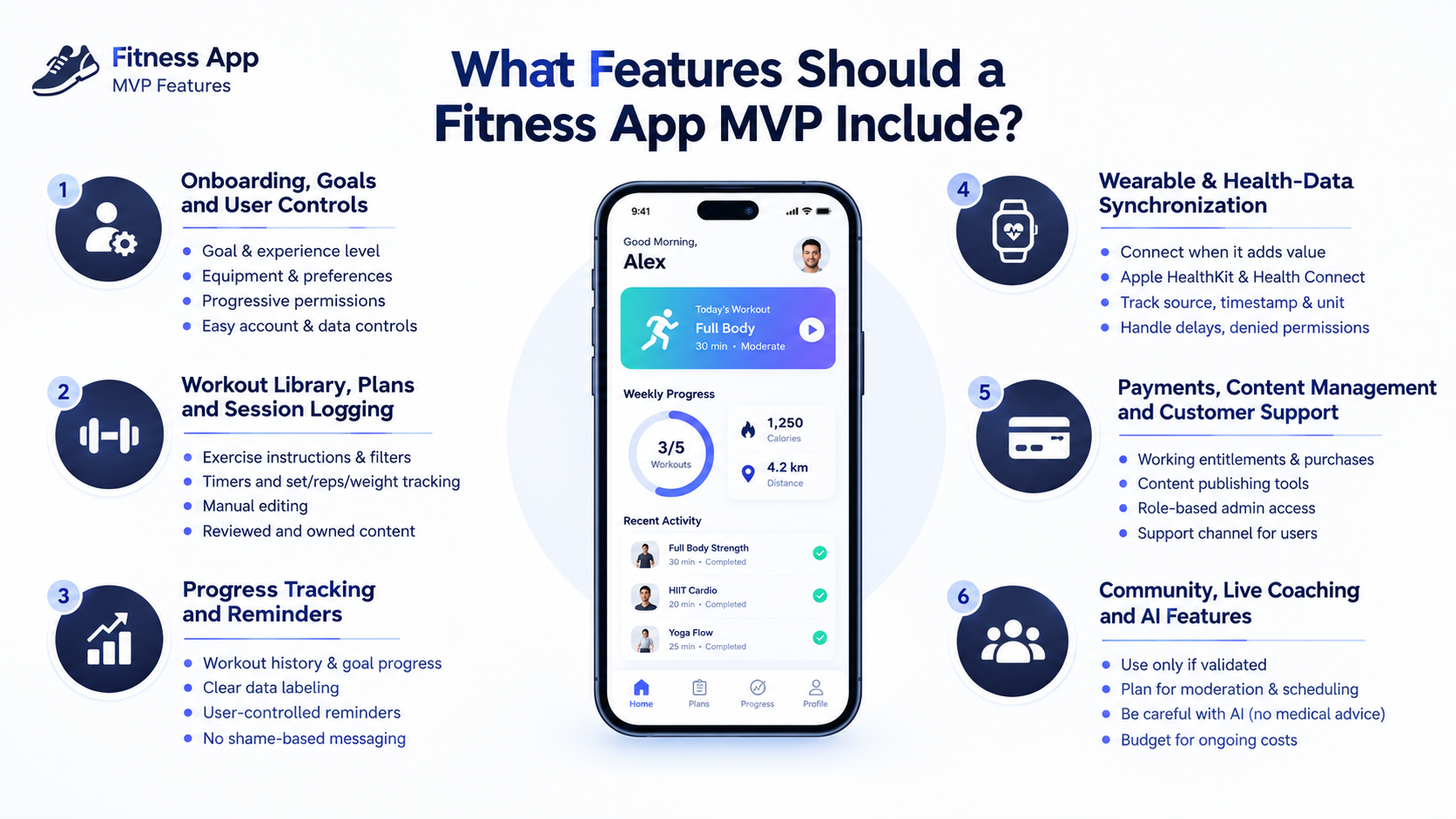
An MVP should let your chosen user complete one useful fitness task and come back to repeat it. For this guide, the baseline example is a workout-content and manual-logging app. That’s a common, low-risk starting point, though tracking-first or coaching-first products need a different mix.
Split your feature list into three buckets. Baseline features ship in every version, no matter the model.
Model-dependent features apply only if your app type needs them, like Health Connect syncing or coach dashboards. Later features, such as live classes or AI recommendations, wait until the core loop is proven.
Privacy, reliable data saves and basic content administration belong in every release. They’re release requirements, not optional upgrades.
Onboarding, goals and user controls
Onboarding should collect only the information needed to deliver the first useful session. Ask about goals, experience level, available equipment and preferences. Only include a question if the answer actually changes what the user sees next.
Build in progressive permissions, so the app asks for access only when a feature actually needs it. Give users a skip path where possible.
Make account and data controls easy to find. Don’t force sensitive body measurements or wearable access just to enable unrelated features.
Workout library, plans and session logging
Users need a clear path from picking a session to recording that they finished it. That includes exercise instructions, filters by muscle group, built-in timers, and fields for sets, reps and weight. Manual editing matters too, since people often adjust a plan mid-workout.
Behind the scenes, workout content needs clear ownership. Someone qualified should review instructions before they publish, with a simple way to update them later. Medical or personalized exercise prescriptions sit outside this scope, since that work has different requirements.
Progress tracking and reminders
Progress displays should help users understand their activity without overstating what the data actually means. Show workout history, goal progress and trends over time. Label what’s logged activity versus what’s a sensor reading or estimate, since mixing those up erodes trust fast.
Reminders work best when users control them. Let people set their own schedule, adjust their goals, and get rest-day support instead of forced streaks.
Skip shame-based messaging entirely. It might spike short-term opens, but it damages the relationship you’re trying to build.
Wearable and health-data synchronization
Integrations belong in the MVP only when they’re necessary for its core value. An app built around manual logging can often launch without deep wearable syncing on day one. Apple’s HealthKit and Android’s Health Connect are the two platforms most apps eventually connect to.
Whatever you sync, track its source, timestamp and unit. Also flag whether it might duplicate an existing entry.
Delayed updates happen, especially with watches that sync in batches. Plan for the case where a user denies permission or has no device connected at all. The app should still feel complete in that state.
Payments, content management and customer support
A paid fitness app needs working entitlements and a real way to run its service day to day. That covers subscription status, purchase restoration for reinstalls, and a support channel for billing or content questions.
On the operations side, you need content publishing tools and role-based admin access. That lets the right people update a plan without touching sensitive user data.
Booking systems, coach dashboards, chat and payouts are model-dependent. Leave them out of a simple workout MVP unless your core value depends on them. of a simple workout MVP unless your core value actually depends on them.
If you want to test a scoped-down version of these features fast, a focused MVP build can help. It lets you validate the model before committing to the full feature set.
Community, live coaching and AI features
Advanced features should solve a validated need. Their ongoing costs belong in that decision from day one.
Community challenges, live classes, coaching chat, recommendation engines and camera-based form feedback all sound appealing early. Each one also adds moderation, scheduling, streaming or evaluation work most feature lists ignore.
Be especially careful with AI-driven features. A chatbot or pose-estimation model isn’t qualified to diagnose an injury or guarantee safe form. Your app shouldn’t imply otherwise.
If AI genuinely improves your core experience, plan for it carefully. An AI-powered feature build still needs human review, a realistic budget and clearly stated limits.
With your feature scope set, the next question is how you actually build and ship it.
How Do You Develop a Fitness App Step By Step?
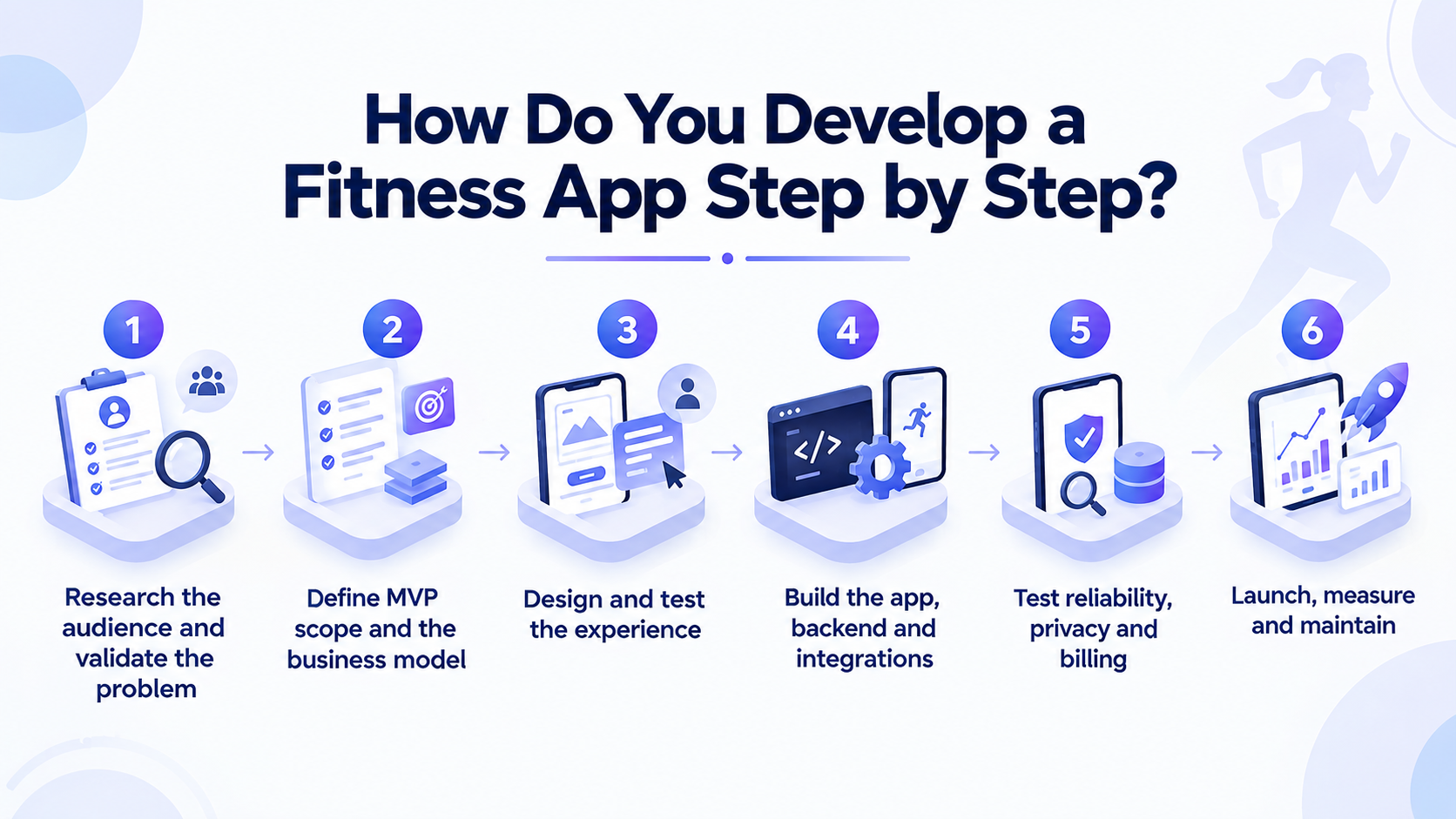
Build and validate the smallest complete experience before you expand the feature set. The six stages below take you from an idea to a live, working product.
Treat this as an iterative process, not a fixed calendar. Any stage can loop back if something doesn’t hold up.
1. Research the audience and validate the problem
Start by learning what your target user actually struggles to do today. Interview a specific segment, not a general fitness audience, and walk through how they currently solve the problem. Look at competing apps or workarounds, then test whether people would actually use, or pay for, your idea.
By the end of this stage, define the core job, audience and general-wellness scope. Deliverable: a product hypothesis.
Gate: move forward only once real evidence supports building a prototype. A clear product development process makes this stage far less guessy.
2. Define MVP scope and the business model
Prioritize the features required to complete your core user journey, and cut everything else. Write requirements and acceptance criteria for each one, so “done” has a clear definition.
Identify your content sources early, and check API feasibility for any integrations. Then choose a monetization hypothesis to test later.
Deliverable: a prioritized backlog with your assumptions written down.
Gate: whether that scope actually fits your available time, team and budget.
3. Design and test the experience
Test the main journey before you invest in production code. Prototype onboarding, session completion, logging and payment flows where they apply.
Then test readability, control size, captions and interruptions. Also test offline states and permission denial with people who match your real users.
Deliverable: a revised prototype based on what you learned.
Gate: whether users can complete the core tasks without getting stuck.
4. Build the app, backend and integrations
Implement a complete vertical slice of the experience, not scattered pieces of every feature. That includes authentication where needed, content delivery, durable logs that survive interruptions, synchronization, entitlements and admin tools. Tackle your hardest integrations early, since they tend to surface problems late otherwise.
Deliverable: a testable increment of the real product.
Gate: whether acceptance criteria pass and critical data flows actually work end to end.
5. Test reliability, privacy and billing
Test real user conditions, not just the happy path. That means different devices and OS versions, poor connections and interrupted workouts.
It also covers revoked permissions, duplicate records, time zone changes, subscription edge cases and account deletion. Confirm your content rights and review process hold up too.
A steady release pipeline and consistent DevOps practices make this stage far less painful across every future update. Deliverable: release evidence.
Gate: blocking defects and policy gaps get resolved before launch, not after.
6. Launch, measure and maintain
Use what you learn at launch to pick your next improvement, not to declare victory. Prepare store listings and required declarations, run a controlled beta first, and keep support ready for real users. Measure activation and repeat activity by cohort, not just total downloads.
Deliverable: a launch report paired with a maintenance backlog.
Gate: scale up only once reliability and real demand support it, and not before.
Once you know how you’ll build the app, the next decision is what you’ll build it with.
Should You Choose Native, Cross-Platform Or a Ready-Made Solution?
Choose your build approach based on the experience you need, the integrations required and your team’s actual capability. There’s no universally cheapest option here, whatever a sales pitch might claim.
| Approach | Best fit | Trade-off |
| Native iOS and Android | Deep device access, wearable integrations, top performance | Two codebases, higher cost, slower parallel iteration |
| Cross-platform: Flutter or React Native | Faster iteration across both platforms with one team | Shared code can still need platform-specific work |
| White-label or configurable platform | Validating an idea fast with limited engineering resources | Less customization, ongoing platform fees, less code ownership |
Flutter and React Native both let one team ship to iOS and Android from a shared codebase. That said, shared code doesn’t eliminate platform-specific testing, especially around wearable integrations and background processing.
A white-label fitness app can get a concept in front of real users quickly. You’ll trade some customization and long-term ownership for that speed.
There’s no single right answer here. The right call depends on what your core experience actually demands.
What architecture and technology does a fitness app need?
A typical connected fitness app separates the mobile experience from content, accounts and service operations. Each piece plays a different role, and understanding that split makes later decisions easier.
| Component | Role |
| Mobile client | Delivers the user experience on iOS and Android |
| Local store and sync queue | Holds data offline and syncs it once connectivity returns |
| API | Connects the client to backend services and business logic |
| Database | Stores user, content and activity records |
| Media storage and CDN | Delivers workout videos and images at scale |
| Notification service | Sends reminders and time-sensitive alerts |
| Billing | Manages subscriptions, entitlements and purchase state |
| Admin console | Lets your team manage content and user support |
Your backend’s exact scope depends on how much you share across platforms and what your business needs. Plan for access control and basic observability from day one.
Think early about how you’ll scale video bandwidth as usage grows. You don’t need microservices for an MVP, no matter what an architecture diagram online might suggest.
How Do Fitness Apps Integrate With Wearables and Health Platforms?
Health-data exchange, watch sensors and third-party cloud APIs are three different integration paths. They’re not one interchangeable category, and mixing them up early tends to cause rework later.
| Integration path | What it provides | Key caveat |
| Apple HealthKit and WorkoutKit | Permissioned access to iPhone and Apple Watch health data | Data sharing and workout scheduling are separate capabilities |
| Android Health Connect | A shared, on-device store for health and fitness data | Not a universal watch SDK. Background access may need extra permissions |
| Wear OS Health Services | Direct access to watch sensors and exercise metrics | Distinct from Health Connect’s phone-based data exchange |
| Third-party activity APIs, such as Strava’s | Imported activities from an existing platform | Access, review and quotas vary by provider and can change |
For every source you connect, track where the data came from and what units it’s in. Also flag whether it might duplicate an existing record.
A watch that syncs once an hour produces delayed updates. Your app needs to handle that gracefully.
Before you commit to any third-party integration, check that provider’s review process, allowed uses and current quotas. They shift more often than most roadmaps assume.
Should a new app use Google Fit APIs?
A new app should follow Google’s current guidance rather than treat Fit APIs as a long-term foundation. As of this writing, Google says the Fit APIs remain supported through the end of 2026. That’s a sunset date, not a stable base to build on.
For new development, Health Connect handles mobile-first, on-device data exchange. The separate Google Health API targets cloud-based use cases instead.
Verify exact support and available data types at implementation time. Guidance in this space changes, and older migration articles can lag behind current reality.
How GymCity Grew From a Gym Tool Into a Fitness Tracker
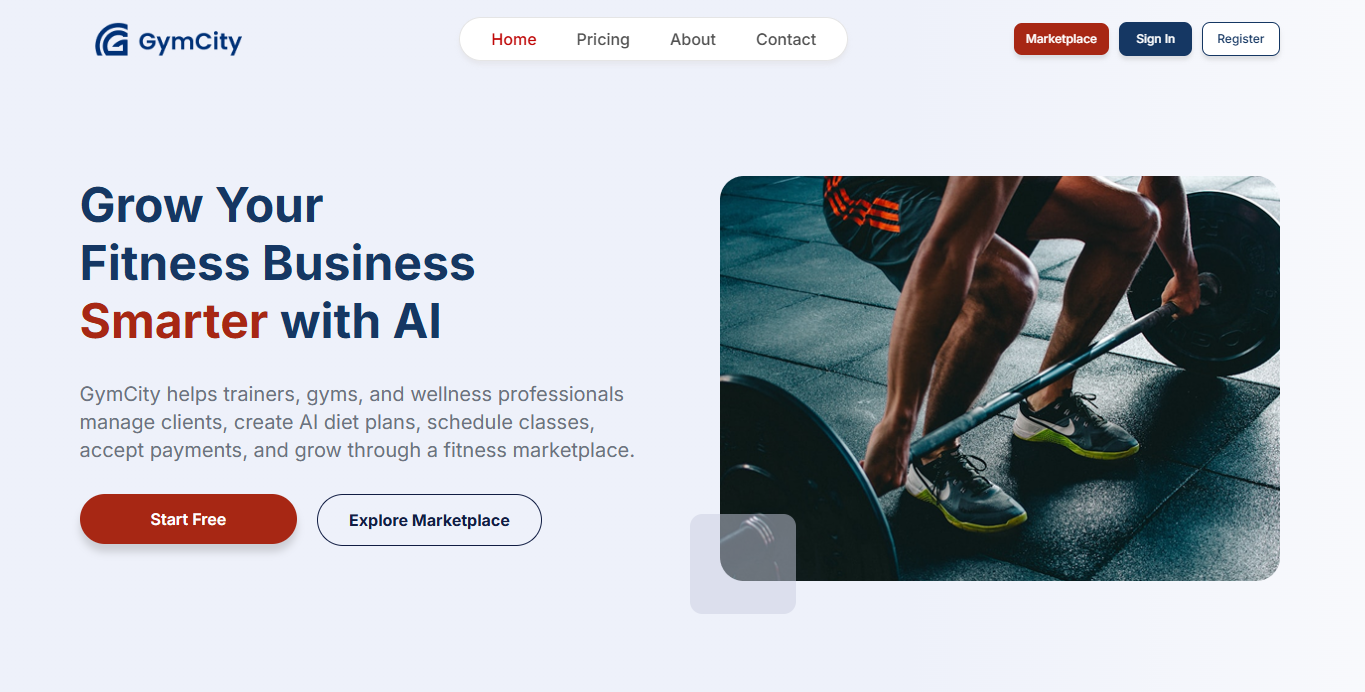
GymCity started as a fix for one gym’s admin workload, then grew into a tracker members use on their own. CodersBucket built it for a local gym running memberships, invoicing and workout schedules on pen and paper. Schedule changes and trainer availability were hard to communicate, members were frustrated, and the gym was losing some of them.
Phase one targeted the owner’s heaviest daily work, not a full consumer feature set:
- Member management with minimal data entry
- Invoices generated automatically from each membership package
- Health records and body measurements
- Workout schedules any trainer could set or update
Phase two opened the product to members. They can connect to their gym, get updates in their profile, and track measurements, schedules and health records whether or not they’re in the building. Moreover, trainers can now see which members are falling behind and step in before those members drift away.
The result held for the original client and beyond. Members stay connected, they track workouts inside and outside the gym, and other gyms have since adopted the product and asked for changes of their own.
Two things stand out for your own planning. GymCity earned its second phase by proving the first one worked. And the wider market only appeared after one real customer’s problem was solved properly.
Once you’ve seen a phased build in practice, the next question is who you trust to run yours.
How Much Does Fitness App Development Cost?
The cost depends on your agreed product scope, delivery team and ongoing operating requirements. There’s no single number that applies across the board. That said, two published vendor estimates help illustrate how wide the range actually is.
Kaopiz lists roughly $30,000 to $50,000 for simple apps. ScienceSoft puts an MVP around $50,000 to $600,000 for a full-featured build.
Treat both as vendor estimates, not comparable quotes or an industry average. Each vendor scopes “simple” and “full-featured” differently.
| Cost driver | Why it moves the price |
| Platform coverage | Native builds for both platforms cost more than one shared codebase |
| Integrations | Wearables, payment processors and third-party APIs each add engineering time |
| Media and content | Video production, licensing and ongoing content updates scale with library size |
| Admin and backend complexity | Role-based access, moderation tools and reporting add development work |
| QA and compliance review | Device testing, privacy review and store compliance take real time to do properly |
| AI features | Model evaluation, review workflows and inference costs add build and running expense |
Your actual number will land somewhere between these drivers, shaped by exactly what you include and exclude. A scope-based estimate from a development partner, done after discovery, will always beat guessing from a published range.
What recurring costs belong in the budget?
Budget for running and improving the service after launch, not just for building it. Recurring costs typically include cloud hosting, media delivery and third-party licenses or APIs. Add subscription infrastructure, content production, customer support, moderation and security or OS updates.
These costs scale differently depending on your model. A video-heavy app’s bandwidth bill grows with watch time. A coaching app’s costs grow with active client volume instead.
There’s no universal maintenance percentage that applies to every product. Treat any figure you see as a rough starting point. If marketing spend gets folded into a proposal, make sure it’s labeled separately from development and operating costs.
How Long Does it Take to Build a Fitness App?
A realistic timeline follows your agreed scope and its dependencies, not a fixed number of weeks. Discovery, prototyping, engineering, integrations, QA, beta testing and store review all take time. Several of these stages overlap rather than running one after another.
Custom coaching features, watch integrations and video production tend to extend the critical path the most. The most reliable approach is to get a milestone estimate after discovery, once your scope is actually defined.
It also helps to separate a prototype, an MVP and a full-featured product in your own head. Each one has a very different timeline.
How Can a Fitness App Make Money?
Match your revenue model to the value users repeatedly get from the app. Don’t just pick whatever looks easiest to build. Each option below carries a different operating requirement and risk profile.
| Model | Fit | Operating requirement | Risk |
| Freemium subscription | Broad consumer apps with a clear premium upgrade | Ongoing content and feature development to justify the paywall | Low conversion if the free tier already feels complete |
| Paid plans or content | Apps with strong, differentiated workout or nutrition content | Consistent content production and licensing | Revenue depends heavily on catalog quality |
| Coaching services | Apps connecting clients with real trainers | Scheduling, support and coach payout systems | Service quality varies by coach, which affects retention |
| Gym or business licensing | B2B sales to studios or corporate wellness programs | Sales, onboarding and account support | Longer sales cycles, dependent on fewer large accounts |
| Sponsorship | Apps with meaningful, engaged audiences | Advertiser relationships and content guidelines | Can conflict with user trust if not handled carefully |
Whatever model you pick, plan for refunds, support load and acquisition costs from the start. They all eat into revenue you might otherwise count as pure profit. One thing worth saying plainly: health data shouldn’t become a default advertising asset just because it’s available.
How do app-store payment rules affect monetization?
Payment requirements depend on what’s being purchased, where it’s consumed and which storefront you’re using. Digital workout content, live one-to-one coaching, and in-person services are all treated differently by app stores. Before you finalize a monetization plan, confirm a few things.
- Check current Apple and Google Play policy for your exact product category and region.
- Look into current alternative billing programs, since they change fairly often.
- Avoid assuming one fixed commission rate applies everywhere.
- Don’t assume a single processor, like Stripe, can handle every purchase type you plan to offer.
What Privacy, Safety and Launch Requirements Matter?
Fitness data, location and any health-related claims need careful product decisions from day one. It’s not a checklist to fill in right before launch.
Treat this section as a planning starting point built on illustrative U.S. sources. Target markets weren’t specified here.
Platform rules, privacy engineering and actual law are three separate things. A market-specific legal review matters before you launch anywhere. You also shouldn’t assume HIPAA applies just because your app touches health data.
Manage health data and user permissions
Collect the minimum data you actually need, and make every permission understandable and easy to revoke. That means purpose-specific permission requests, secure access controls, and encryption appropriate to how data is stored and transmitted. Add clear retention limits, real deletion workflows and a review process for any third-party SDKs you add.
In the U.S., HIPAA applies based on specific entity relationships, not just because an app touches health information. Non-HIPAA products can still face other obligations, including the FTC’s health breach notification rule in certain situations.
There’s no universal compliance badge that covers every fitness app. Treat this as a starting point for your own review.
Keep fitness guidance within the intended product scope
General wellness guidance and medical claims need very different levels of scrutiny. The FDA’s general wellness policy offers useful U.S. context here. That said, it isn’t a blanket exemption for everything a fitness app might say.
Plan for qualified content review, clearly stated limits, and an escalation path for anything AI-generated or personalized. Body metrics and calorie estimates shouldn’t imply diagnostic accuracy they don’t actually have. Finally, confirm that any exercise videos, music or trainer content you use is properly licensed before it ships.
Improve Retention Without Sacrificing User Trust
Measure whether users repeatedly complete the task your app was actually built for. That’s a different question than whether they simply opened it. The distinction shapes almost everything about how you read your metrics.
| Metric | What it tells you |
| Activation rate | Whether new users reach their first meaningful, completed activity |
| Cohort retention | Whether specific groups keep coming back over time |
| Paid conversion | Whether your value proposition justifies payment |
| Churn | How many users are leaving, and how fast |
| Reliability | Whether the app actually works consistently for real users |
Reminders, relevant plans and progress feedback are worth testing. Treat them as ideas to validate, not guaranteed retention drivers.
What works for one audience can flop for another. Avoid incentivizing unsafe activity levels, and never compare users to each other using body metrics alone. That approach tends to backfire, both ethically and in the metrics themselves.
How Do You Choose a Fitness App Development Partner?
Ask potential partners to demonstrate relevant product and integration experience, not just a polished pitch deck. A few specific questions separate a strong partner from a risky one.
- Ask for comparable app work, ideally with case studies you can actually review.
- Confirm named delivery roles, so you know who’s actually building your product.
- Get a scope-based estimate rather than a rough ballpark figure.
- Ask how they approach health-data handling and device testing.
- Clarify source-code ownership before you sign anything.
- Understand what maintenance looks like after launch, and ask for references.
Some teams also work through an offshore development team model to manage cost without sacrificing quality. That’s worth asking about directly. Whichever structure you choose, get exclusions and ongoing operational costs in writing before work starts.
Frequently Asked Questions
These questions address common early decisions in fitness app development.
Can I build a fitness app without coding?
Yes, configurable platforms can support some fitness app concepts, especially for early validation. They’re useful for testing an idea quickly and cheaply.
That said, they tend to hit limits around custom integrations, portability and recurring platform fees. They also rarely cover every wearable or workflow you might need.
Should I launch on iOS, Android or both?
Choose based on evidence about your target users and whatever integrations your core experience needs. Launching on one platform first lets you validate faster with less overhead. Two-platform reach comes with real benefits too, but shared code doesn’t remove platform-specific testing.
Does a fitness app need AI?
No, AI is optional unless it solves a validated user problem better than a simpler approach would. Curated plans or straightforward rules-based personalization often work just as well, at a fraction of the cost. If you do pursue advanced recommendations, budget for evaluation, ongoing operating costs and clearly stated limits.
Can a fitness app work offline?
Yes, selected tasks can work offline if you design storage and synchronization for them from the start. Downloaded content and workout logging are good candidates, with data syncing once connectivity returns. Live coaching and some account or payment functions will still need an active connection.
Can I build an app like Strava or MyFitnessPal?
You can address a similar user need with an original, narrower product of your own. Pick one core activity or food-logging journey, and verify API access and data rights before you build anything. Avoid copying branding or proprietary assets, and don’t assume your costs will match theirs.
Plan Your First Fitness App Release
Start with a defined audience, one complete user journey, and a scope-based estimate instead of a guess. Validate the problem first, build for reliable delivery, and let measured iteration guide what you add next.
No guide can promise you a fixed cost, a launch date or a specific health outcome. Be skeptical of anyone who does.
Want a second opinion on your MVP scope before you commit resources? Our team is happy to talk it through.