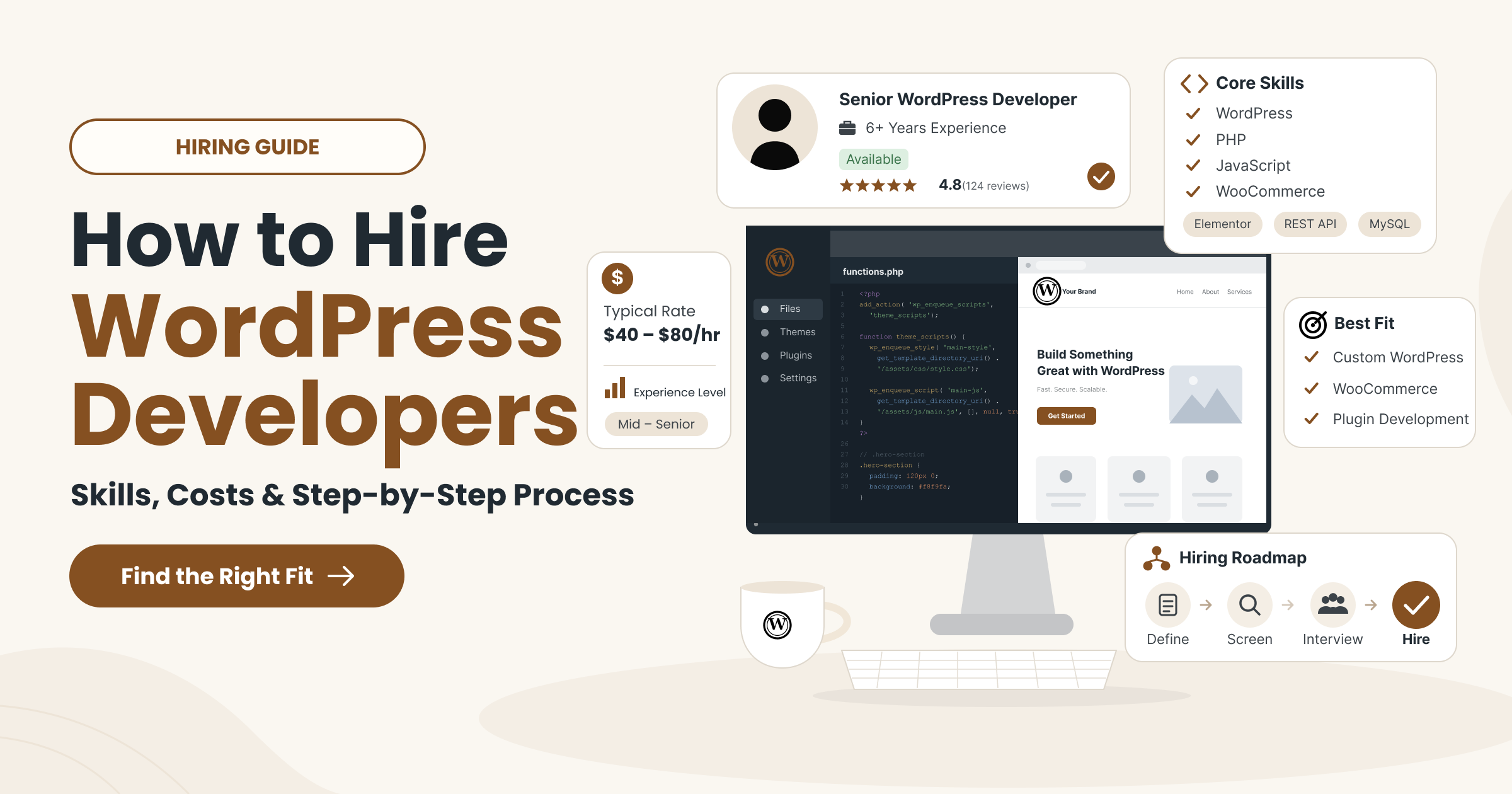
To hire WordPress developers well, match their proven experience to the work your website actually needs. A developer who builds great marketing sites may not be the right fit for a complex WooCommerce checkout. So smart hiring starts with scope, not job titles.
This guide is for business owners, marketing teams and agencies that need reliable delivery capacity.
You’ll see which WordPress experts fit which projects and how engagement models compare. You’ll also learn what proof to request and what hiring really costs. Finally, a six-stage process takes you from project requirements to a safe first milestone.
Hiring WordPress Developers at a Glance
Your project scope and how much management you can handle decide which developer and engagement model fit. The table below compares three common projects across five hiring decisions.
| Decision | Narrow fix | Marketing-site rebuild | Complex store |
| Work needed | Repair a contact form that broke after a plugin update | Rebuild key pages with reusable, editable layouts | Custom checkout, subscriptions and ERP sync |
| Specialist skill | Debugging and plugin conflict resolution | Block theme or page-builder implementation | WooCommerce and API integration engineering |
| Hiring model | Freelancer or small hourly engagement | Freelancer or agency project team | Agency team or dedicated developer |
| Proof to request | A similar fix explained step by step | An editor demo of a comparable site | Staging tests of purchases, refunds and failed payments |
| First deliverable | Fix verified on staging, then released | One approved template your editors can use | Technical audit and one tested checkout flow |
None of these models is best for everyone. The right choice depends on risk, ongoing workload and who will manage the developer day to day.
What can a WordPress Developer Help You Deliver?
A WordPress developer builds, customizes and maintains the code and integrations behind a WordPress website. That’s different from visual design, content entry or configuring tools you already have. Many projects need all four, so be clear about which ones you’re buying.
Most WordPress development work falls into six areas:
- Theme work: Building or customizing the templates that control layout and design.
- Plugins: Writing custom plugins or extending existing ones with your business rules.
- Integrations: Connecting the site to CRMs, payment gateways, email platforms and other systems.
- Store workflows: Setting up WooCommerce checkout, shipping, tax and order handling.
- Migrations: Moving content, users or hosting without breaking important URLs.
- Maintenance: Keeping WordPress core, themes and plugins updated, tested and recoverable.
Design, copywriting, hosting administration and technical SEO may or may not be included. Ask every candidate to state this in writing. Compare this list with our WordPress development services to see how one team scopes the work.
Which WordPress Developer Should You Hire For Your Project?
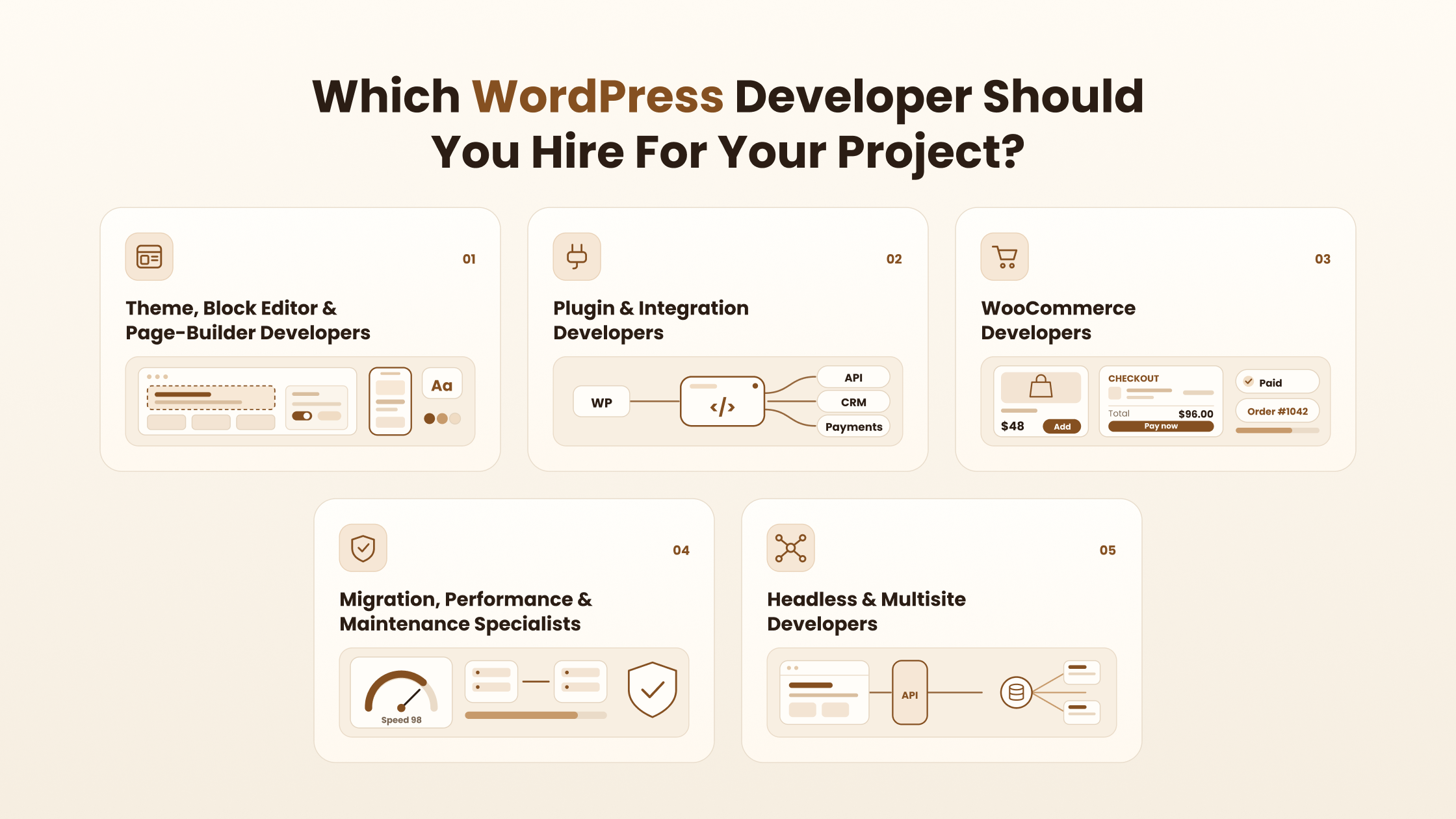
Choose the specialization around the hardest part of your project. One person can cover several specialties, so treat them as skill areas, not fixed job titles. The matrix below links common project needs to the evidence and acceptance checks worth requesting.
| Project need | What to ask for | Acceptance check |
| Theme or builder fit | One representative template and editing workflow | Editors can build a page without developer help |
| Lead form | Field rules, destination and failure handling | Valid and invalid entries tested, and the message arrives |
| Custom code | An authorized code sample or paid assessment | The developer explains decisions, tests and standards used |
| Permissions and data | A role map and data flow | Permission checks reviewed for every custom action |
| Staging and recovery | Staging access and a backup method | An issue reproduced on staging and a restore shown |
| WooCommerce | Payment, shipping and tax rules | Staging purchase, refund and failed-payment cases pass |
| API integration | API access and the data contract | Clear mapping and recovery from a failed request |
Theme, block editor and page-builder developers
The developer needs real experience with the editing system your team will use after launch. WordPress offers block themes, built for the Gutenberg block editor, and classic themes, built mainly with PHP templates. The WordPress Theme Handbook explains how each one works.
Block themes control global styles through a theme.json file. Third-party builders such as Elementor add their own widgets, templates and editing rules on top.
Ask for maintainable templates, reusable patterns and a live editor demo. A strong candidate shows how your marketing manager could add a page without breaking the layout. Check custom PHP or JavaScript depth only when your scope needs it.
One caution: builder experience doesn’t prove advanced plugin engineering. Arranging Elementor widgets and writing secure custom code are different skills.
Plugin and integration developers
Custom business rules and data connections need proof of real extension and integration work. Ask the developer to walk through a relevant example, such as a CRM connector or booking integration. A strong explanation covers four points:
- Hooks: Which WordPress actions and filters they used, and why.
- Data flow: How information moves between WordPress and the outside system.
- Access control: Who can trigger each action and how permissions are checked.
- Error recovery: What happens when an API call fails or times out.
Request code the developer is authorized to share. A paid assessment tells you more than a vague promise when client contracts block that.
WooCommerce developers
A store developer should demonstrate the checkout and order workflows your business depends on. Match their experience to what you actually need. That might be subscriptions, shipping rules, taxes, payments or an ERP integration.
Ask them to run staging tests for purchases, refunds and failed payments. Also check extension compatibility with High-Performance Order Storage, or HPOS, which changes how WooCommerce stores orders. The WooCommerce HPOS recipe book explains what compatibility involves.
A catalog screenshot isn’t proof of checkout engineering. Pretty product pages and reliable order handling are separate jobs. Our roundup of the best ecommerce development companies covers broader options if you’re still comparing store partners.
Migration, performance and maintenance specialists
Existing-site work needs a clear diagnosis and recovery plan before anyone changes code. The table below matches common problems to the specialty and the evidence to request.
| Problem | Specialty needed | Evidence to request |
| Moving to new hosting or a new domain | Migration | Content inventory, URL map and redirect test plan |
| Site broke after an update | Debugging | Reproduction on staging and a rollback plan |
| Important pages load slowly | Performance | Baseline measurements on agreed pages and conditions |
| Nobody owns updates | Ongoing maintenance | Update schedule, backup checks and escalation contacts |
Agree which pages and metrics matter before work starts. No honest developer can promise zero downtime, perfect speed scores or unchanged rankings. For older, heavily patched sites, a broader platform modernization plan may be more practical than repeated fixes.
Headless and multisite developers
Headless and multisite experience matters only when those architectures solve a real requirement. Most business websites need neither.
A headless setup uses WordPress for content and a separate frontend, often built with React, to display it. Content usually reaches that frontend through the WordPress REST API. Assess how the developer handles content preview, authentication, cache invalidation and frontend deployment.
Headless can make sense when the same content feeds a website and an app. In that case, the work overlaps with custom software and mobile apps development.
Multisite runs a network of sites from one WordPress installation. Look for experience with network roles, shared code and site-specific settings. Single-site skill doesn’t prove network administration depth.
Should You Hire A Freelancer, An Agency Or A Dedicated Developer?
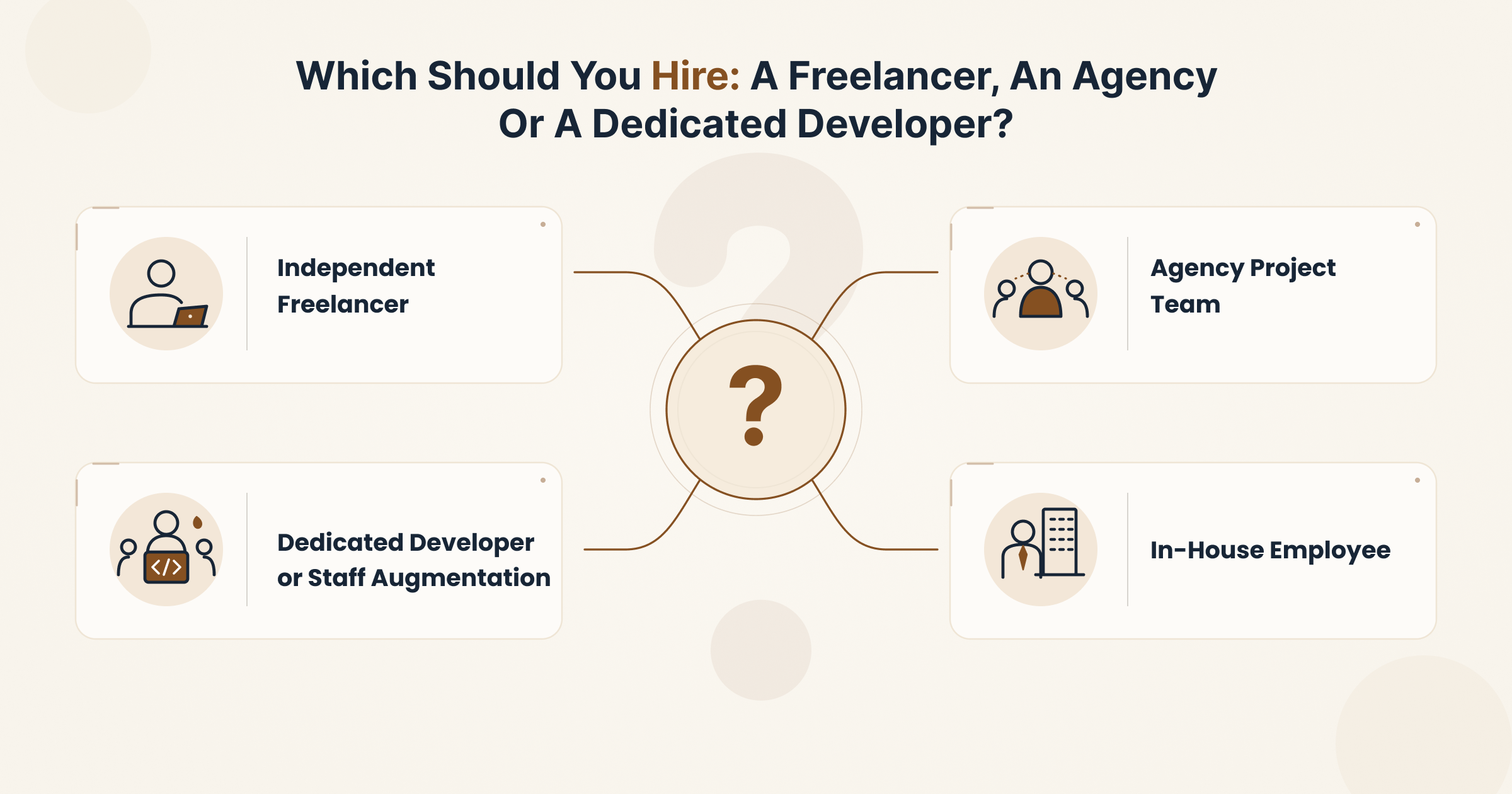
Choose a hiring model based on who will manage delivery and how much ongoing capacity you need. The table below compares four common options across five factors.
| Model | Best-fit work | Day-to-day manager | Continuity | Capacity | Pricing basis |
| Independent freelancer | Defined fixes and small builds | You | Depends on one person | One person’s available hours | Hourly or fixed price |
| Agency project team | Full builds with design, QA and project management | Agency project manager | Team covers absences | Scales with the team | Fixed price or milestones |
| Dedicated developer or staff augmentation | Ongoing roadmap work | You or your tech lead | Stable while the allocation lasts | Agreed allocated hours | Monthly rate |
| In-house employee | Constant, long-term needs | Your internal manager | Strong if retention is good | One person’s full working time | Salary plus benefits and overhead |
Dedicated describes how a developer’s time is allocated, not who employs them. Many agencies supply dedicated WordPress developers on monthly terms. And dedicated doesn’t automatically mean exclusive or full-time, so confirm hours in writing.
Agencies often face a different problem: more client work than their own team can deliver. In that case, an agency partnership and white label arrangement can add capacity under the agency’s brand.
Should you hire local, remote or offshore WordPress developers?
Location changes how you collaborate, but skill still needs direct evaluation. A local developer and an offshore one should pass the same assessment.
Nearshore and offshore are relative to where you are. For a client in Canada, a developer in Mexico is nearshore, while one in Bangladesh is offshore. Compare these practical factors instead of relying on country stereotypes:
- Working-hour overlap: How many shared hours you need for calls and quick decisions.
- Language: Whether written and spoken communication suits your team.
- Escalation: Who you contact when something breaks outside shared hours.
- Access policies: How credentials and data handling rules apply across borders.
- Handover: How work is documented so another developer can pick it up.
Remote doesn’t mean offshore, and offshore doesn’t guarantee savings. Ask exactly how overlap hours and escalation work if you’re weighing an offshore development team.
What Skills Should You Look For In A WordPress Developer?
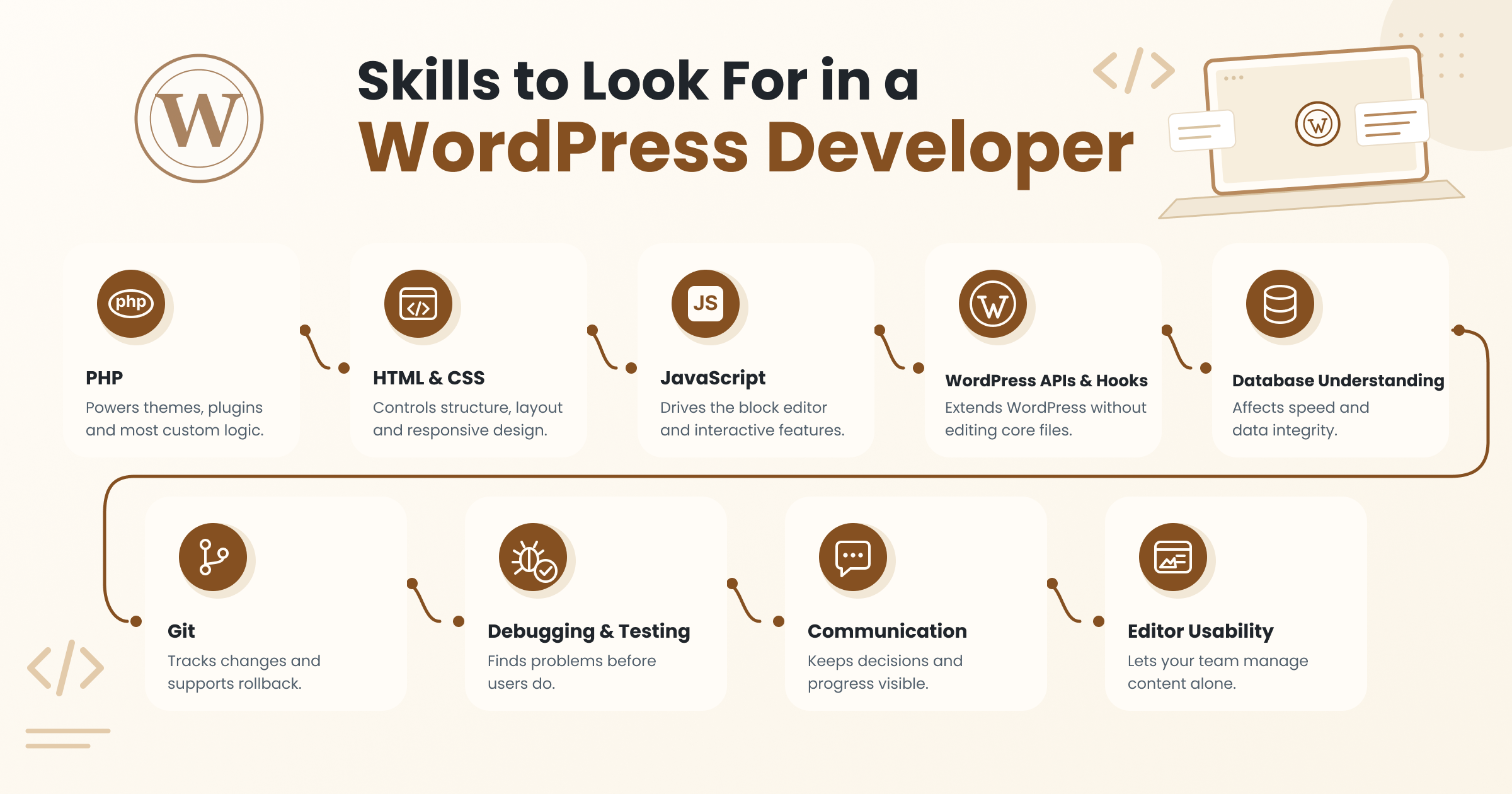
Assess practical WordPress developer skills against your deliverables, not a generic technology list. The table below maps each core skill to evidence you can observe.
| Skill | Why it matters | Evidence to look for |
| PHP | Powers themes, plugins and most custom logic | Readable code that follows WordPress conventions |
| HTML and CSS | Controls structure, layout and responsive design | Clean markup that works on the agreed devices |
| JavaScript | Drives the block editor and interactive features | Working custom blocks or front-end features, where needed |
| WordPress APIs and hooks | Extends WordPress without editing core files | Correct use of actions, filters and REST endpoints |
| Database understanding | Affects speed and data integrity | Efficient queries and care with custom tables |
| Git | Tracks changes and supports rollback | A clear commit history and branch workflow |
| Debugging and testing | Finds problems before users do | Reproduction steps and a test summary |
| Communication | Keeps decisions and progress visible | Written updates with progress, blockers and next steps |
| Editor usability | Lets your team manage content alone | A demo of editing without developer help |
Advanced React, custom block development and server infrastructure skills are conditional. Require them only when your scope does. The WordPress Coding Standards make a useful review aid, though following them isn’t a certification.
How Do You Verify A Developer’s Experience?
Ask the developer to explain their exact contribution to a comparable project and demonstrate the relevant work. A portfolio shows what exists, but not always who built it. Use this checklist during the review:
- Who built what: Ask which parts they wrote, designed or only configured.
- Project constraints: Ask about the budget, deadline and technical limits they worked within.
- Code ownership: Confirm whether they can share code or need to anonymize it.
- Release history: Ask how they shipped updates and handled problems after launch.
- References: Speak to past clients, but only with the developer’s permission.
A live URL may have changed since the developer delivered it. Another team may have edited the site since then, so review the context and their attributed contribution.
Years of experience alone don’t prove seniority. For agencies, read their case studies and ask who on the current team worked on each one.
Which interview questions reveal practical WordPress skills?
Scenario questions show how a developer diagnoses issues and explains trade-offs. The table below lists five prompts and the evidence that signals a strong answer.
| Interview question | Strong evidence |
| A plugin update broke the site. What do you do first? | Reproduces the issue on staging, checks logs and rolls back safely |
| Should this feature live in the theme or a plugin? | Keeps business logic in a plugin so it survives a theme change |
| How would you secure a custom form? | Mentions validation, sanitization, escaping and permission checks |
| The checkout is slow. How do you find the cause? | Profiles queries and requests before changing any code |
| How do you hand over a finished site? | Describes documentation, access transfer and deployment notes |
Don’t demand one exact implementation answer. Good developers can reach sound results through different methods, so judge the reasoning.
What should a paid trial task include?
A small paid task should resemble the work you plan to commission. For example, ask the developer to modify one reusable content component on staging.
The task should keep the component easy to edit, add a relevant check and include a written explanation. Agree time, payment, acceptance criteria and code rights before they start. Then evaluate four things:
- Correctness: Does the change work as specified?
- Reasoning: Can they explain why they chose this approach?
- Maintainability: Could another developer understand and extend it?
- Communication: Were updates clear and on time?
Never ask for unpaid production work. And never give a trial candidate unrestricted access to your live site.
Where Can You Find WordPress Developers?
Use sourcing channels that let you verify relevant work and agree clear delivery terms. Each channel puts screening responsibility in a different place, as the table below shows.
| Channel | Who screens | Engineer visibility | Fees and terms |
| Referrals | You and the referrer | Direct | Set by your own agreement |
| Specialist networks such as Toptal or Codeable | The network, then you | Usually named profiles | Platform fees or markups apply |
| General marketplaces such as Upwork | Mostly you | Direct profiles | Platform fees and contract rules apply |
| Agency teams | The agency, then you | Ask who is assigned | Agency contract with support terms |
| Direct recruitment | You | Direct | Salary, benefits and hiring costs |
These names are examples, not rankings. For a wider view of agency options, see our list of top website design and development companies.
How Do You Hire WordPress Developers Step By Step?
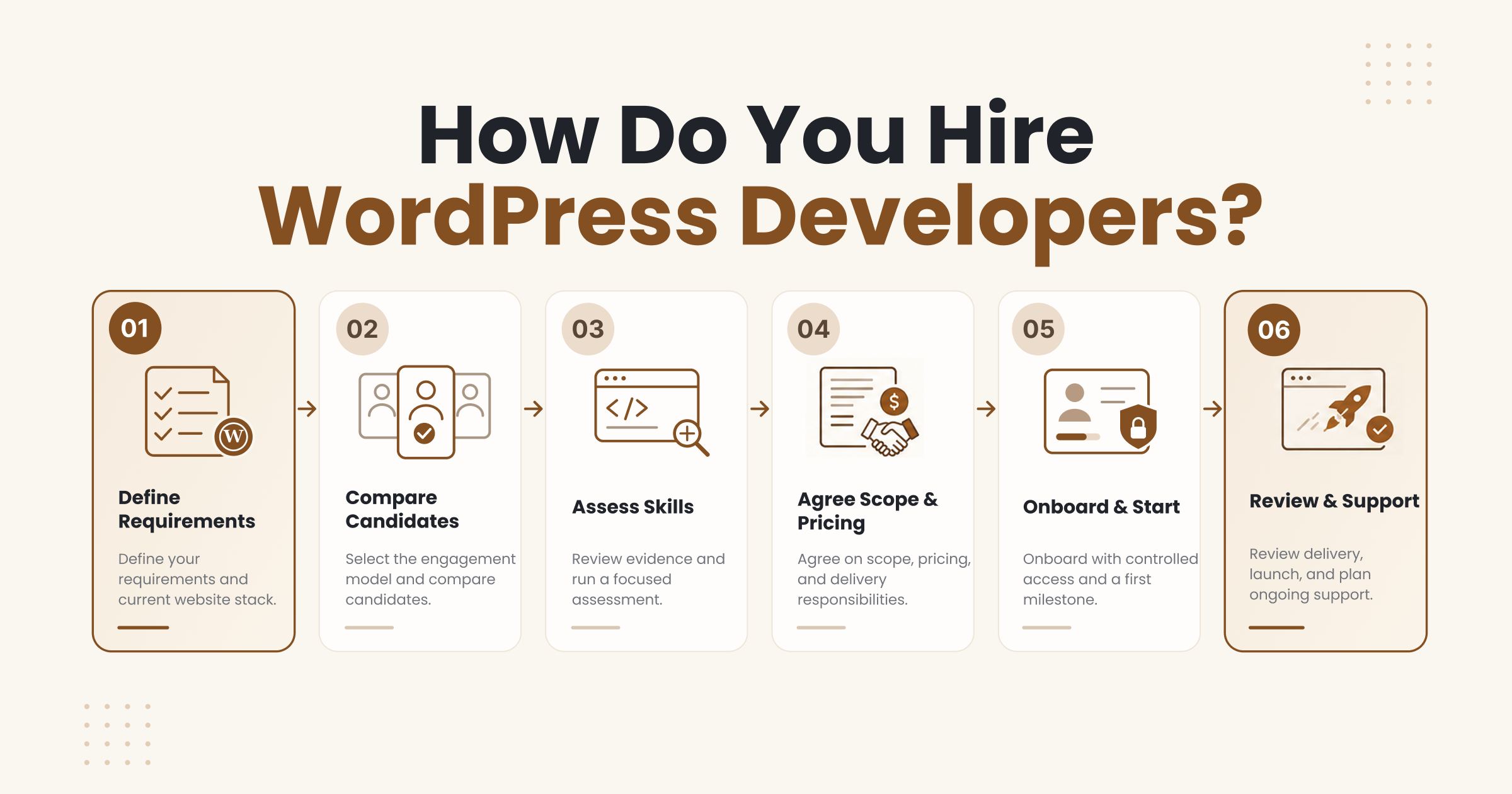
To hire WordPress developers safely, start with a written requirement and a small accepted deliverable. Each of the six stages below produces an output and ends with a decision gate. A one-off fix moves through them quickly, while an ongoing team engagement needs more depth at each gate.
1. Define your requirements and current website stack
Start by documenting the business outcome and the environment the developer will inherit. Record these details in your brief:
- Site URL and hosting model.
- WordPress and PHP versions.
- Theme or page builder in use.
- Installed plugins and integrations.
- User roles and known issues.
Add constraints, content responsibilities and success criteria. Deliverable: a project brief. Gate: you know which specialist you need and what’s still unknown.
2. Select the engagement model and compare candidates
Send the same scope to every candidate who can show the required specialization. That keeps their answers directly comparable.
Compare availability, allocated hours, management duties and relevant work. Ask who will actually do the work and whether any part is subcontracted.
Deliverable: a comparable shortlist. Gate: every remaining candidate meets your essential requirements.
3. Review evidence and run a focused assessment
Validate capability through a project walkthrough and a proportionate practical test. Use the interview questions and paid trial described above.
Agree assessment criteria in advance, then record evidence against your brief. Deliverable: a documented evaluation. Gate: the candidate has shown both fit and clear communication.
4. Agree scope, pricing and delivery responsibilities
A useful agreement makes deliverables, exclusions and acceptance explicit. Record these points before work begins:
- Estimate assumptions and milestones.
- How change requests are priced and approved.
- Account and source code access.
- Third-party license responsibilities.
- Support boundaries and exit handover.
Name who accepts each milestone and who approves payment. Contract law varies by location, so get proper advice on legal terms.
Deliverable: agreed scope and commercial terms. Gate: both sides understand their responsibilities.
5. Onboard with controlled access and a first milestone
Give the developer only the access and context needed for a limited first deliverable. Use named accounts, the least access the task requires and a staging environment.
Confirm backup and recovery arrangements, then set up a shared backlog. Agree update cadence, contact points and escalation paths.
Deliverable: a working environment and first milestone. Gate: the developer can safely reproduce and test the work.
6. Review delivery, launch and plan ongoing support
Accept work against agreed checks and confirm who owns the next update. Validate functionality, agreed devices and browsers, editor workflows and regression risks.
Before launch, collect the source code, documentation and deployment and rollback instructions. For frequent releases, automated pipelines from a DevOps service solution can make rollbacks more predictable.
Deliverable: an accepted release and handover. Gate: you can operate the site and get support when you need it.
How Much Does It Cost To Hire WordPress Developers?
The cost to hire WordPress developers depends on the work, the experience required and the services included. An hourly rate means little until you know what it covers. Six factors drive most quotes:
- Scope: More pages, features and integrations mean more hours.
- Specialization: WooCommerce, headless and security work often cost more than theme edits.
- Legacy complexity: Old, heavily patched sites need diagnosis before estimates firm up.
- Urgency: Rush timelines often carry premium rates.
- Coordination: Project management and meetings add time.
- Testing: Proper QA adds hours but reduces costly rework.
Codeable, for example, bases estimates on an $80 to $120 USD hourly rate. Its pricing page then adds a 17.5% service fee on top. That’s one provider’s pricing, not a market range.
Don’t average marketplace profile rates into a universal benchmark either. Profile rates rarely reflect the full cost of delivering working software.
Hourly, fixed-price or monthly: which pricing model fits?
Match the payment model to how certain your scope is and how you want capacity managed. The table below compares the three main options.
| Pricing model | Best for | What to agree |
| Hourly | Evolving work or diagnosis | Time tracking, regular reports and a spending cap |
| Fixed price | Well-defined projects | Acceptance criteria and a change request process |
| Monthly retainer | Ongoing updates and roadmap work | Included hours or services and overage rules |
Keep an employee salary separate from a contractor rate. A salary excludes benefits, equipment and management time, while a contractor rate often covers some overhead.
Compare total delivery cost, including management, QA and support. A cheap rate with heavy rework usually costs more than a fair rate done right.
What costs should you budget beyond development?
Your operating budget should cover the dependencies and support your website needs after launch. Common categories include:
- Hosting: Recurring, and usually tied to traffic and server resources.
- Premium licenses: Recurring fees for themes, plugins and page builders.
- External APIs: Often usage-based, such as payment, maps or email services.
- Maintenance: Recurring updates, monitoring and backup checks.
- Testing: Extra QA for major releases or store changes.
- Content entry and migrations: One-off costs that are easy to forget.
Also separate three kinds of post-launch work. A defect warranty covers bugs in delivered work. Ongoing care covers updates, while new features count as new scope.
How Long Does It Take To Hire And Onboard A Developer?
Hiring time depends on specialist availability, assessment, approvals and how ready your environment is. Treat it as four phases: sourcing, agreeing terms, onboarding and delivering the first milestone.
Missing access, unclear scope and late content are common causes of delay. Each one can stall a capable developer before any real work begins.
Be wary of any universal 24-hour hiring promise. A small diagnostic engagement can resolve unknowns before you commit to a full build.
How Do You Manage Quality, Security And Ongoing Support?
Quality depends on agreed checks and clear operational ownership throughout the engagement. Responsibility is shared between you, the developer, your hosting provider and third-party vendors.
No single developer can make a site completely secure. So each of the three areas below needs a clear owner.
Testing, performance and editor usability
Use checks that reflect your real visitors, editors and business workflows. Test these areas on staging before every major release:
- Key forms, including failed submissions.
- Navigation and responsive layouts on agreed devices.
- User roles and permissions.
- Store flows such as checkout and refunds, where relevant.
- Keyboard navigation and understandable error messages.
Agree performance baselines and measurement conditions in advance. Keep technical SEO tasks separate from ranking outcomes, and treat accessibility as evidence-based work. A plugin or a single automated scan can’t prove full compliance.
Access, updates and recovery
Control access, keep dependencies updated and prove that recovery actually works. Request these controls from day one:
- Named accounts: Every action is traceable to a real person.
- Task-based permissions: Each person gets only the access the task needs.
- Secure credential sharing: Passwords move through a password manager, never email or chat.
- Staging: Risky changes never touch live workflows first.
- Restore checks: Backups are proven, not assumed.
For custom code, check validation, sanitization, escaping and authorization. The WordPress security APIs explain each one. Note that a nonce isn’t authorization, so capability checks are still required.
Agree how access is removed when the engagement ends and how incidents are escalated. The WordPress advanced administration security guide covers updates, roles and recovery planning in more depth.
Documentation, account ownership and continuity
A finished engagement should leave you able to operate and maintain the site. Before you sign off, confirm you have:
- Repository access and deployment instructions.
- Admin control of the domain and hosting accounts.
- A clear record of license responsibilities.
- Operational contacts for each vendor.
Record what’s custom, what’s third-party and what’s provider-managed. Agree absence cover, replacement arrangements and exit handover too.
Code rights depend on your agreed terms and the licenses involved. Don’t assume universal exclusivity over every file on the site.
What Mistakes Should You Avoid When Hiring WordPress Developers?
Most hiring mistakes start with unclear work or evidence that doesn’t match it. The table below pairs five common mistakes with a practical check.
| Mistake | Better check |
| Choosing only by hourly rate | Compare total delivery cost, including QA, management and rework risk |
| Trusting screenshots without contribution details | Ask exactly what the developer built and request a walkthrough |
| Assuming all WordPress skills are interchangeable | Match the specialty to the hardest part of your scope |
| Leaving support undefined | Agree warranty, maintenance and response expectations in writing |
| Unclear access or licensing | Keep core accounts in your business’s name and log every license |
Investigate further if a developer won’t explain relevant past work. Confidentiality agreements can be a valid reason, so it isn’t automatic proof of a problem. An anonymized walkthrough or paid trial can fill the gap.
Frequently Asked Questions
Can I hire a WordPress developer for a small task?
Yes, a clearly bounded fix or improvement can be scoped as a small engagement. Define the issue, the environment, the acceptance check and your support expectations. Confirm any minimum engagement or diagnostic charge before work starts.
Do I need a WordPress designer or developer?
Hire for the work you need: interface design, implementation or both. Some professionals cover both, but confirm their actual capability. A design file and a working, tested website have different acceptance criteria.
Can a developer work on my existing WordPress website?
Yes, after reviewing your existing setup, access and technical constraints. An audit may be needed before anyone can estimate repairs or new features. Share dependencies, backups, staging details and known failures at handover.
Can I hire part-time or dedicated WordPress developers?
Yes, both arrangements work when the provider or candidate offers them. Confirm allocated hours, availability, response times and who manages the work. Also check the developer’s other commitments before you plan around their time.
Will the developer provide maintenance after launch?
Only if you agree on it explicitly. Maintenance should list included updates, monitoring, response times and coverage hours. Confirm which third-party issues are excluded so nothing falls between vendors.
What should I prepare before requesting a developer quote?
Prepare the outcome you want, your current stack, the required work, constraints and acceptance criteria. Add example pages, integration documentation, a target date and budget context. Share credentials only through an agreed secure access process.
Find The Right WordPress Developer For Your Scope
The best way to hire WordPress developers is to start small and specific. Begin with a defined task, relevant evidence and a small accepted milestone.
Match specialists to your hardest requirement and verify their real contribution. Then agree ownership before you grant access, and expand once the first delivery proves the fit.
Contact us if you’d like a second opinion on your project. Share your site URL, the work needed, your stack, target timing and budget context. The CodersBucket team can talk through which developer and engagement model suit your scope.