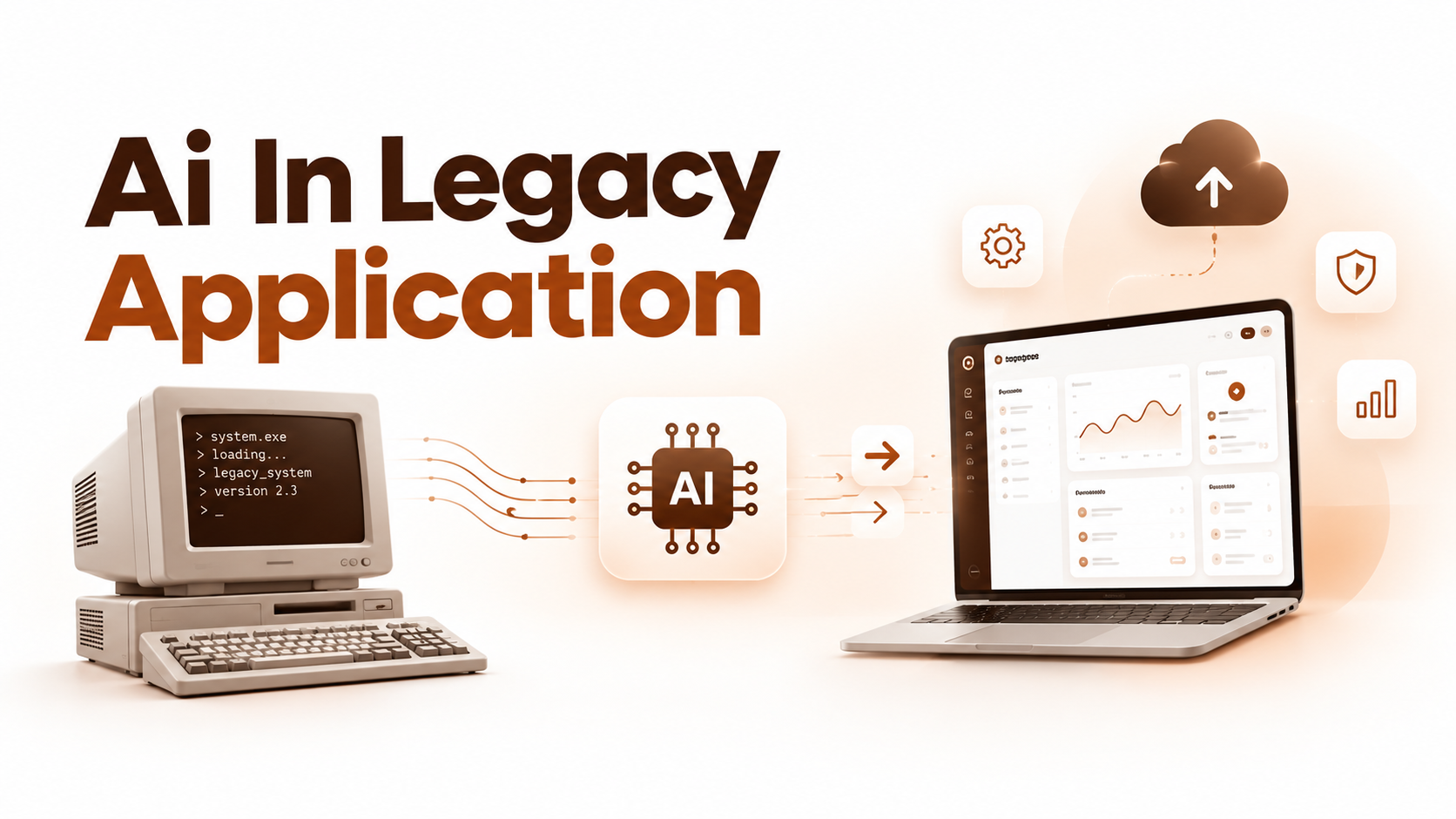
AI in legacy application modernization uses AI to help analyze, refactor, test and migrate old software. Every output still needs human validation against real system evidence. Common use cases include code analysis, dependency mapping, framework upgrades, code translation and test generation.
AI in legacy application modernization works best when its outputs are checked against real system evidence. That includes understanding old code, refactoring it, generating tests and planning migrations. From there, expect coverage of strategy, a working implementation process, available tools and key risks.
You’ll also see how to measure real outcomes along the way. AI supports a modernization program, but it doesn’t establish correctness on its own.
It doesn’t decide your business case for you either. That judgment still comes from engineers, domain experts and real evidence.
TL;DR
- AI helps most with code analysis, dependency mapping, refactoring, test generation and migration support, not with replacing engineering judgment.
- Every AI output needs a validation gate, like an expert review, a regression test or an independent check.
- Pick a modernization strategy, such as retain, retire, rehost, replatform, repurchase or refactor, before choosing AI tools.
- Follow a six stage implementation process: assess, build context, pilot, generate changes, validate, then roll out gradually.
- Tools like AWS Transform, GitHub Copilot, IBM watsonx, Claude Code and OpenRewrite support different stages, but none is a universal solution.
- The biggest risks are incorrect outputs, sensitive data exposure and cost overruns, each needing a named owner.
- Measure ROI with review and rework hours, escaped defects and run cost, not just lines of code changed.
What is Ai In Legacy Application Modernization?
AI in legacy application modernization means using AI to help assess, understand, transform and validate existing software. A legacy application isn’t necessarily old. It’s any system where business risk, brittle architecture, missing documentation or scarce expertise make change slow and risky.
A broader application modernization effort can touch more than code. It can mean runtime upgrades, architecture changes or data platform moves. Operational changes count too, like continuous integration and delivery, known as CI/CD.
The focus here is AI assisted engineering: analysis, refactoring, testing and migration work on the existing system. Adding a chatbot or predictive feature to a legacy application is a different objective. It comes with its own design and risk profile.
How Do Generative AI, Agents And Conventional Automation Differ?
Different forms of automation do different jobs in modernization work. The table below breaks down the three main approaches.
| Approach | What it does | Best for |
| Generative AI: LLMs | Explains code and drafts changes in plain language | Understanding logic, writing first draft code or tests |
| Agentic AI | Coordinates tools and makes iterative, multi step changes | Working through a bounded task across several files |
| Deterministic automation | Applies the same rule based transformation every time, the way tools like OpenRewrite do | Repeatable, well defined upgrades such as API replacements |
Most real projects combine all three. Predictive machine learning belongs in the mix only when telemetry actually supports a specific use case. Not every migration tool deserves the AI label just because it’s automated.
Where Can AI Help Modernize Legacy Applications?
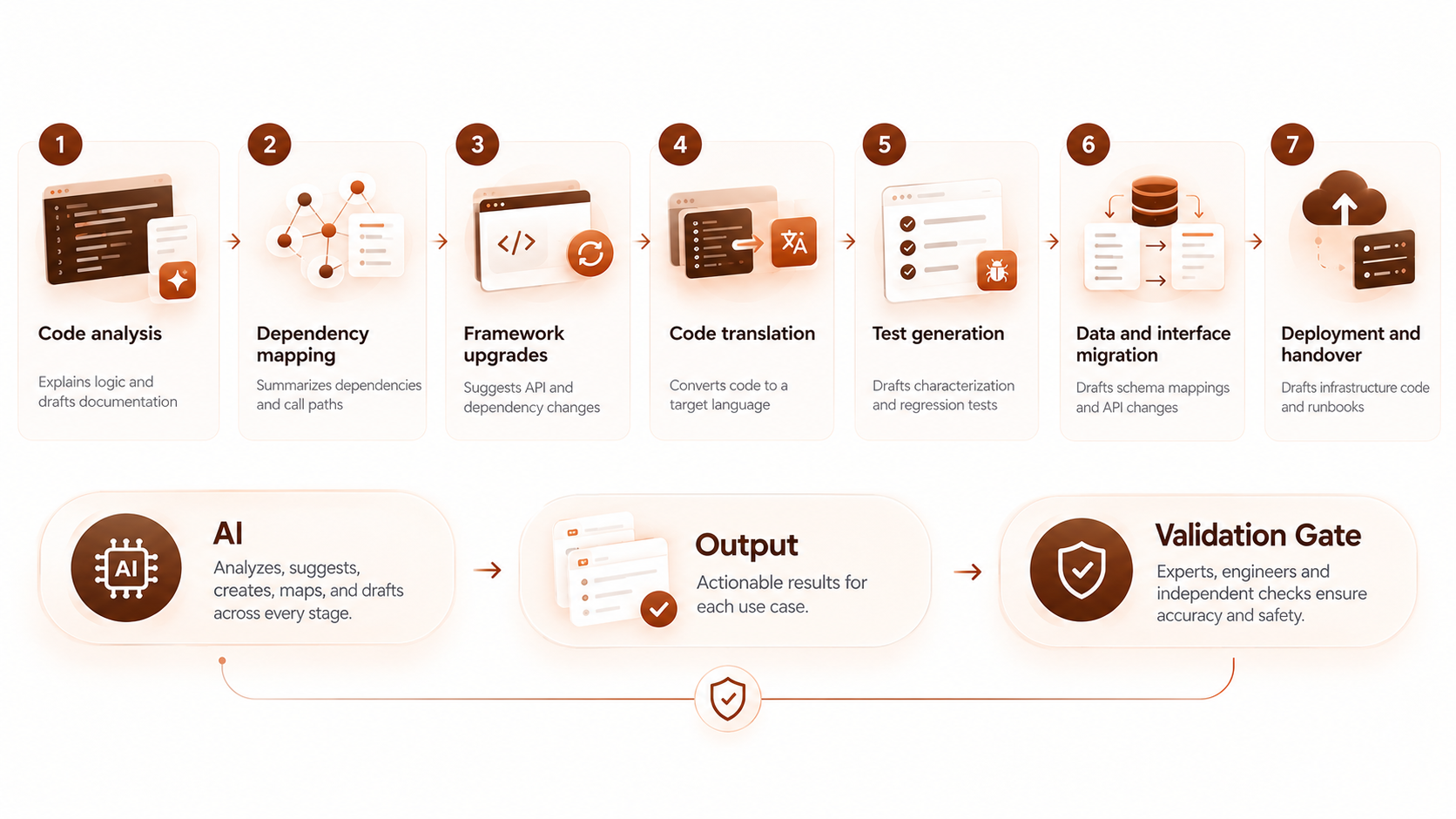
AI can help at several stages of modernization, but every output still needs a validation method. The seven use cases below cover analysis, refactoring, testing, migration and deployment work.
| Stage | AI contribution | Output | Validation gate |
| Code analysis | Explains logic and drafts documentation | Business rule summary | An expert confirms exceptions and edge cases |
| Dependency mapping | Summarizes dependencies and call paths | Prioritized migration candidates | Engineers check it against runtime traces |
| Framework upgrades | Suggests API and dependency changes | Updated, compiling code | Regression tests and a reproducible build |
| Code translation | Converts code to a target language | Draft translated module | Domain approved expected results match |
| Test generation | Drafts characterization and regression tests | Expanded test suite | Independent review of expected outcomes |
| Data and interface migration | Drafts schema mappings and API changes | Migration and mapping plan | Database validation and reconciliation checks |
| Deployment and handover | Drafts infrastructure code and runbooks | Deployment assets | Environment validation and permission review |
Each use case below explains the mechanics and where things typically go wrong.
Analyze Code And Recover Business Rules
AI can help explain unfamiliar code and draft a description of what it currently does.
Say a billing module applies a discount under conditions nobody documented. An AI assistant can read the relevant functions and trace the related configuration values. It can then draft a plain language explanation grounded in specific source locations and domain terms.
Ask a subject matter expert, or SME, to confirm any exceptions the explanation surfaces. Some of what looks like an intentional rule is actually accidental behavior nobody meant to keep.
Treat the AI’s explanation as a draft, not a verified spec, until someone signs off on it.
Map Dependencies And Prioritize The Application Portfolio
AI can help summarize dependencies across a codebase and support migration planning.
Combine repository analysis with runtime traces, interface contracts, batch schedules and ownership records. Any one of these sources alone tends to miss something real.
A dependency map built from code alone often misses dynamic calls. It can also miss external consumers that only show up at runtime.
Treat every AI generated dependency map as incomplete until someone checks it. Rank migration candidates by business value, change risk and feasibility. Don’t just pick whichever system looks easiest to touch first.
Upgrade Frameworks And Refactor Code
AI assistance can complement tested recipes for upgrades that already have a known, supported path.
Take a Java or .NET framework upgrade as a bounded example. AI can suggest API replacements, update dependencies and handle local refactoring across many files quickly. That speed only counts once the result compiles and passes tests.
Require version specific compatibility checks before you trust an upgrade. A reproducible build and a full regression test pass matter more than how fast the change was generated. Not every library or language has equally mature support, so verify coverage before you commit to a stack.
Translate code while preserving required behavior
AI can assist with selected language translations. A successful compile is only the first check, not the last.
COBOL to Java translation is a specific, well known workload, not something every legacy system needs. Numeric precision, transaction behavior, file formats and external interfaces all need close attention during translation. A program that compiles cleanly can still handle a decimal rounding rule differently than the original.
Require domain approved expected results before accepting translated code as equivalent. Don’t treat generated code as semantically equivalent to the original without that evidence in hand.
Generate and extend modernization tests
AI can draft tests and help identify scenarios that still need coverage.
Useful targets include characterization tests, regression tests, contract tests and boundary condition inputs. A characterization test captures what the system currently does.
That’s a different goal than testing what it should do. That distinction matters more than it sounds.
Tests generated from the same incorrect interpretation of a rule can repeat that mistake instead of catching it. Derive expected outcomes from approved business rules, known outputs or an independent check. Never derive them from the same explanation you’re trying to verify.
Support data and interface migration
AI can draft schema mappings and interface changes, while dedicated migration tools handle the actual data movement.
Keep those two roles separate in your head. AI suggested mappings still need review for identifiers, decimal precision, character encoding and null handling.
Referential integrity and change data capture, or CDC, for ongoing sync both need careful design. A mapping suggestion alone isn’t enough.
Database validation remains a conventional control here. Row level comparison between source and target confirms the migration worked.
It doesn’t confirm that AI performed the migration correctly. The tool and the check are two different things.
Assist deployment and operational handover
AI can help draft deployment assets and interpret diagnostic output during a release.
That includes infrastructure as code drafts, runbook updates and incident summaries pulled from logs. These drafts still need environment specific validation and least privilege permissions before anyone runs them in production. A well run DevOps practice makes this validation routine rather than a last minute scramble.
Keep this work distinct from adding AI powered observability features to the running application. Drafting a deployment script is not the same project as shipping a new monitoring capability.
What Benefits Can AI Assisted Modernization Deliver?
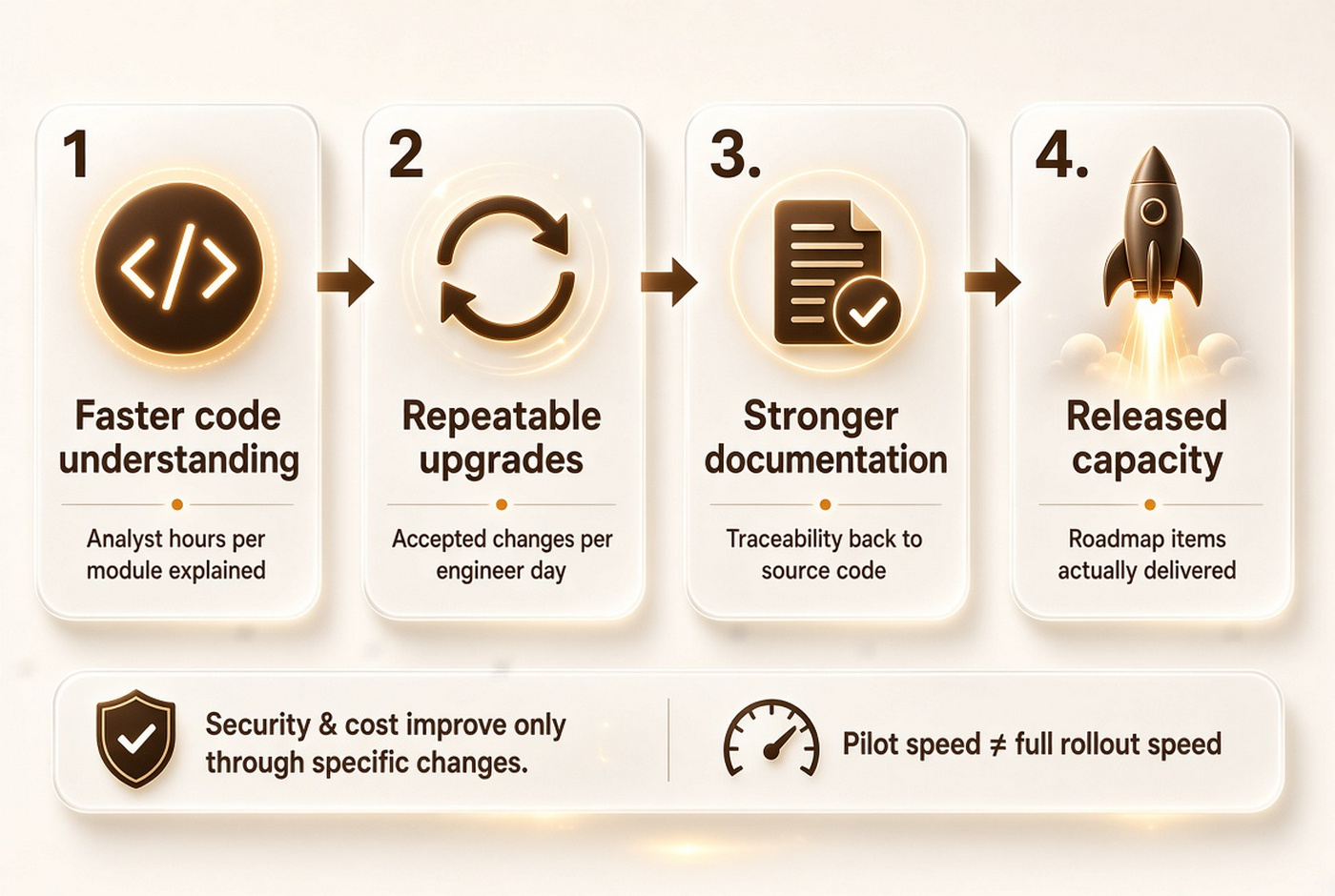
Potential benefits depend on the workload and how much review and rework the changes actually require. The table below maps common claims to something you can measure.
| Claimed benefit | What to actually measure |
| Faster code understanding | Analyst hours spent per module or system explained |
| Repeatable upgrades | Accepted changes per engineer day, not just changes generated |
| Stronger documentation | Traceability from documented behavior back to source code |
| Released engineering capacity | Roadmap items actually delivered, not hours saved on paper |
Security and cost can both improve through specific modernization changes, like retiring an unsupported runtime. They don’t improve automatically just because AI touched the code.
Keep task level speed separate from full program outcomes when you report results. A fast pilot doesn’t guarantee a fast rollout.
Which Modernization Strategy Should You Choose?
Choose the modernization strategy from the business problem first, and pick AI tools second. AWS names six common paths as the 7 Rs. That’s one widely used framework, not the only one.
| Strategy | When it fits | AI’s role |
| Retain | The system works and change risk outweighs the benefit | Minimal, mostly documentation and monitoring |
| Retire | The capability is no longer needed | Helps confirm nothing else still depends on it |
| Rehost or relocate | You need to move infrastructure without changing the app | Limited, mainly assessment and configuration drafts |
| Replatform | You want minor changes to run better on new infrastructure | Assists with targeted code and config updates |
| Repurchase | A commercial product now covers the same need | Helps map data and process gaps during switchover |
| Refactor or re architect | The application needs structural change to move forward | Most applicable, from analysis through code generation |
AI plays a genuinely useful supporting role in refactoring and re architecture work. It contributes far less to a straightforward rehost. Migrating or translating code also doesn’t automatically improve your architecture, and not every system actually needs microservices.
When is incremental modernization preferable to a full rewrite?
Incremental modernization can limit the size of each change. Old and new capabilities can then coexist for a while.
The strangler fig pattern puts a facade in front of the legacy system. Traffic then routes to new functionality piece by piece.
A modular monolith is a lighter option, keeping one deployable unit but with clearer internal boundaries. Both approaches need well bounded seams.
A shared database across old and new code creates its own coordination problems.
Incremental migration isn’t automatically simpler than a rewrite, and it doesn’t guarantee zero downtime. It does let you validate each piece before the next one ships, which a big bang rewrite can’t offer.
How Do You Implement AI Assisted Legacy Modernization?
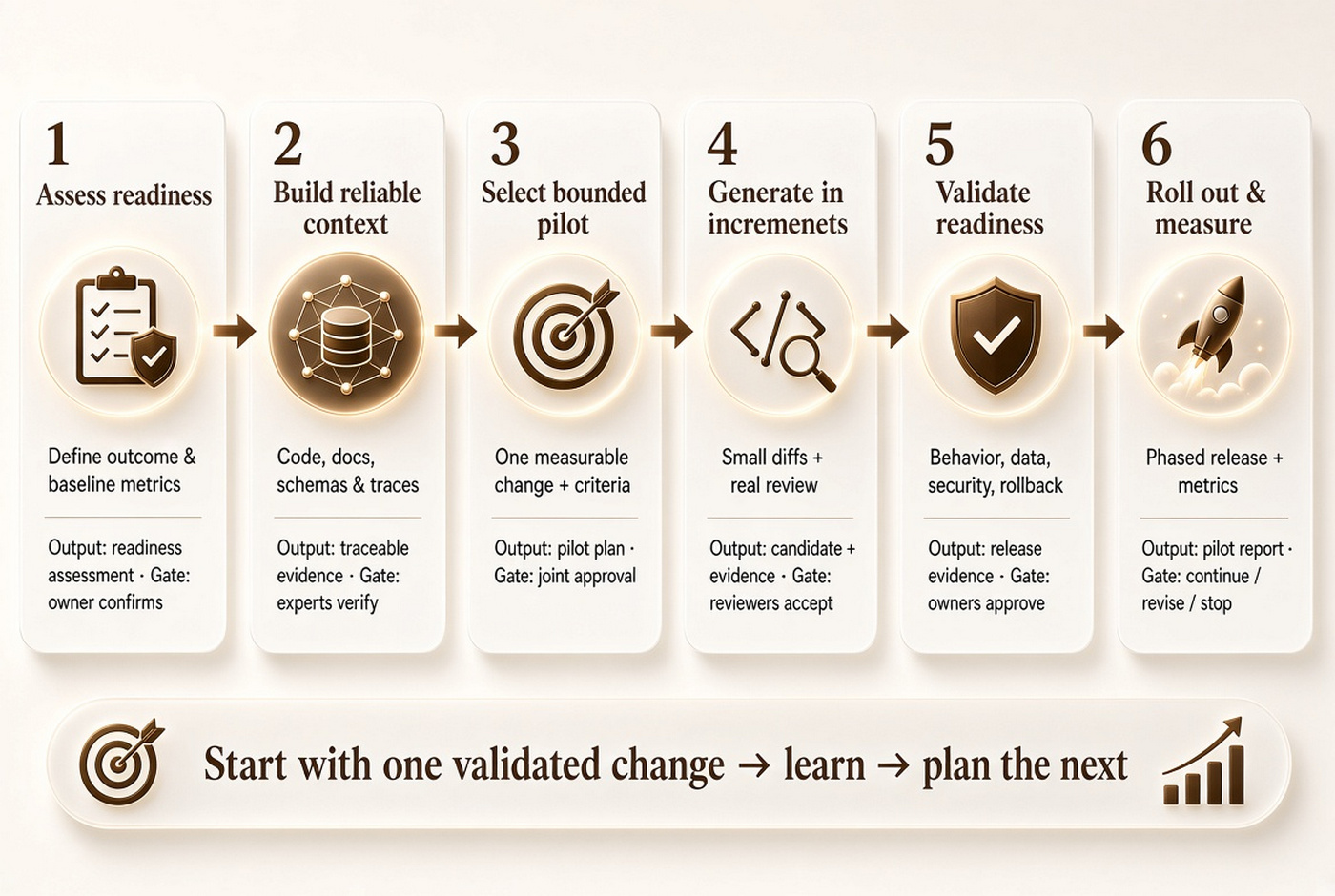
Start with an assessed application and one bounded change you can actually validate. The six stages below take that change from idea to production. Then it’s back into planning for the next one.
1. Assess readiness and set a baseline
Define the outcome you want, and record what the current system actually does today.
Inventory source and build access, test environments, dependencies, data classification and ownership. Capture current cycle time, defect rate and run cost as your baseline. Without a baseline, you can’t tell whether the pilot actually improved anything.
Output: a readiness assessment. Gate: a named owner confirms the pilot is both worthwhile and feasible.
2. Build reliable context for the AI system
Give the tool relevant, permissioned evidence about the application, not just a prompt and a hope.
Use code, documentation, schemas and approved execution traces as source material. Retrieval augmented generation, or RAG, and knowledge graphs are optional techniques for organizing that context, not guarantees of accuracy.
Preserve source references in every output, and keep the context current as the codebase changes. Teams that already run internal AI agent and knowledge tooling often have a head start here.
Output: a traceable evidence set. Gate: experts verify that explanations are actually representative, not just plausible sounding.
3. Select a bounded pilot and agree acceptance criteria
Choose one representative service or upgrade with behavior you can observe and measure.
Set criteria for critical user journeys, latency, data reconciliation and rollback readiness before you generate anything. Avoid picking a trivial demo, since it won’t teach you much. Avoid the most critical system too, since a failed first pilot there costs more than it should.
Output: a pilot plan. Gate: engineering and business owners approve the scope together.
4. Generate changes in small, reviewable increments
Combine automated transformations with real engineering review, not one instead of the other.
Work in a branch, inspect every diff, run the build and test the changed behavior directly. Restrict what permissions any coding agent actually has, and record which tool and model version produced each change. An AI powered automation workflow still needs this discipline, no matter how capable the underlying model is.
Output: a candidate increment with supporting evidence. Gate: reviewers accept both the code and its intended behavior.
5. Validate behavior, data and operational readiness
Validate the complete increment before it goes anywhere near a production cutover.
Check regression and integration behavior, security, performance and source to target data reconciliation together. Rehearse routing and rollback, including how any new writes made during the cutover window get reconciled afterward. Skipping this rehearsal is how teams discover rollback plans don’t actually work, right when they need them most.
Output: release evidence. Gate: designated owners approve the release itself.
6. Roll out gradually and measure the result
Use production evidence to decide whether to expand the modernization effort further.
Use phased routing or a canary release where the architecture supports it. Monitor both service and business metrics as you go.
Assign clear rollback triggers ahead of time, along with a decommission decision for whatever the new version replaces. Output: a pilot report and a next wave plan. Gate: a straightforward call to continue, revise or stop, based on what you measured.
Which Tools Support AI Assisted Modernization?
Choose tools by the workload and evidence requirements they support, not by a general claim of autonomy. Product names, versions and availability status shift often, so recheck these before you commit. The comparison below reflects publicly documented capabilities as of this writing.
| Tool | Scope | Stage supported | Validation needs |
| AWS Transform | Mainframe and .NET workloads | Analysis, business rule extraction, transformation | Human review of extracted rules and generated code |
| GitHub Copilot app modernization | Framework and dependency upgrades | Assessment through code generation | Build validation, since IDE and CLI support differ |
| IBM watsonx Code Assistant | Java runtime modernization | Assessment, automation, generative assistance | Version specific compatibility and regression checks |
| Claude Code | General purpose agentic coding, including COBOL exploration | Code exploration, dependency mapping, documentation | Source linked review of every generated explanation |
| OpenRewrite | Deterministic, recipe driven refactoring | Framework and dependency upgrades | Recipe testing, since it’s automation, not an LLM |
None of these tools rank above the others in any general sense, and their capabilities aren’t equivalent. Match the tool to the workload, then verify its current support matrix directly with the vendor.
How should you evaluate tools and implementation partners?
Test the tool and the team on your own representative workload, not a vendor’s polished demo.
Ask about supported languages and frameworks, and how traceable the outputs are. Also check how well the tool integrates with your existing tests.
Confirm data handling, deployment model, usage pricing and rollback support in writing. Reviewing a portfolio of comparable work helps here.
So does asking what an accepted change actually costs once review and rework are included.
Some organizations manage this through an offshore development team model to control cost while keeping quality bars intact. Whichever route you take, verify a vendor’s privacy and licensing terms directly. Don’t assume private deployment or zero data retention just because a sales page implies it.
What Risks And Limitations Need To Be Managed?
AI assistance introduces its own risks, on top of whatever migration risks already exist. The table below maps each one to a practical control and an owner. The H3s that follow add more detail.
| Risk | Control | Owner |
| Incorrect outputs and hidden behavior | Source linked review and independent expected results | Engineering lead, with business SMEs |
| Sensitive code and agent permissions | Approved inputs, least privilege, sandboxed execution | Security and platform teams |
| Migration failure and cost overruns | Small batches, transitional design, cost tracking | Architect, operations lead, program sponsor |
Incorrect outputs and hidden behavior
Plausible explanations and compiling code can still be wrong in ways that are easy to miss.
Watch for hallucinated APIs that don’t actually exist, plus missed edge cases. Also watch for quiet loss of tacit business rules nobody wrote down.
Controls include source linked explanations, independently derived expected results, domain review and real integration testing. The engineering lead owns this, working alongside business subject matter experts.
A passing test suite is evidence within the scope of what it tests. It isn’t proof the system is correct for every input it might see.
Sensitive code, data and agent permissions
Treat source code, prompts and any execution access an agent has as governed assets, not incidental details.
Proprietary code, secrets, personal data and even malicious instructions hidden in retrieved files are all real exposure points. Recommended controls include approved input sources, secret removal before anything reaches a model, least privilege access and sandboxed execution.
Security and platform teams own this. Access should get reviewed on a schedule, not just once at setup.
No modernization tool grants blanket regulatory compliance just by being used. Verify what your specific situation actually requires.
Migration failure, cost overruns and new technical debt
Faster code generation can increase rework if the underlying architecture and cutover plan stay unresolved.
Watch for dual run costs that run longer than planned, incompatible data changes, rollback limitations and vendor dependence. Generated code that nobody can maintain easily is its own form of new technical debt. Controls include working in small batches, transitional design choices and active cost tracking throughout the project.
The architect, operations lead and program sponsor share ownership here. No single role can catch every failure mode alone.
When should you avoid or postpone AI driven changes?
Postpone AI driven write automation when you can’t reliably evaluate its outputs yet.
Common blockers include a missing build environment, no representative tests or data, and unresolved code use permissions. Unclear business rules or an unsupported technology stack are common too.
Read only analysis can still be useful even when you’re not ready to generate changes. It helps you understand the system while you close those gaps.
Sometimes retaining or retiring a system is the better call, not rewriting it. Not every legacy application is worth the modernization effort.
How Much Does AI Assisted Modernization Cost, And How Do You Measure Roi?
Estimate costs across the full delivery lifecycle, not just the AI tooling itself. Assessment, licensing and inference, context preparation and engineering time all belong in the number. So do validation, data migration, dual running, training and ongoing support.
A matched pilot versus baseline comparison gives you a more honest read than a vendor’s general estimate. Define return on investment, or ROI, as attributable benefits minus incremental costs.
Divide that by incremental costs for the same measurement period. Watch for double counting here: freed up labor capacity and actual cash savings are not the same thing. Combining them inflates the number.
There’s no reliable universal price range to quote for this kind of work. Scope varies too much between projects. A scope based estimate for your specific workload will always beat a published range from somewhere else.
Which metrics show that modernization is working?
Measure accepted outcomes and operational quality alongside raw speed, not speed on its own.
| Metric | What it captures |
| End to end lead time | How long a change takes from start to accepted release |
| Review and rework hours | How much human effort each AI assisted change actually needs |
| Escaped defects | Problems that reach production despite testing |
| Critical journey pass rate | Whether the most important user flows still work correctly |
| Data mismatches | Reconciliation errors found between source and target systems |
| Latency and error rates | Whether the modernized system performs at least as well |
| Run cost | Ongoing infrastructure and operating cost after the change |
Define your denominator and baseline clearly before you start measuring anything. Lines of code changed and the number of generated tests are activity measures. Neither one is a sufficient business outcome on its own.
What Do Real World Examples Show?
Published examples illustrate what’s possible, but their scope and measurement method differ quite a bit.
AWS and Thomson Reuters: a vendor reported .NET migration. AWS reports that Thomson Reuters saw four times faster modernization velocity. That followed a move of .NET workloads from Windows to Linux with AWS Transform.
AWS also reports 30% lower costs from that same move. That’s a vendor published customer case, not an independent benchmark.
Treat the cost reduction as a result of the broader migration, not an AI only saving. The Windows to Linux move itself changes licensing costs on its own.
A COBOL reverse engineering proof of concept. Practitioners writing on martinfowler.com describe experiments using code comprehension and knowledge graph techniques on legacy systems. Their write up includes estimates from an internal proof of concept tool.
A proof of concept estimate describes a bounded experiment, not a production rollout. It doesn’t describe what a full rollout would cost or deliver across a different codebase.
Both examples are worth reading in full before you cite them anywhere.
Neither one licenses a general claim about typical time or cost savings. Your own workload will move the numbers either way. If you want a closer look, our case studies page covers comparable modernization work.
Can AI Modernize Legacy Applications Without Rewriting Them?
Yes, AI can support analysis, upgrades, documentation and incremental changes without a full rewrite. Modernizing an application in place is one path.
So is exposing it through a new API, or selectively refactoring risky modules. A full rewrite is one option among several, not the default starting point.
Can AI Replace Developers And Legacy System Experts?
No, AI assistance doesn’t remove the need for technical and domain judgment. Someone still has to understand business intent, spot unusual behavior and stay accountable for what runs in production. Forecasts about AI replacing these roles outright go beyond what current evidence supports.
Does Cobol Modernization Require Moving Off The Mainframe?
No, the target platform is a separate decision from whether you modernize the code itself. IBM, for example, documents selective COBOL to Java transformation designed to keep running on IBM Z. Moving to a different platform is one option, not a requirement.
How Long Does AI Assisted Modernization Take?
The duration depends on scope, dependencies and how much validation the change actually needs. A single pilot or framework upgrade can move in weeks, while a full portfolio program runs much longer. Don’t generalize one team’s fast result to every other project, since scope rarely matches exactly.
Can Sensitive Applications Use AI Modernization Tools?
It depends on the specific tool, its data handling, its permission model and your validation requirements. Run a security and architecture review against the actual deployment and service terms you’d be signing up for. A vendor’s marketing label is not the same thing as a certification or a legal compliance guarantee.
Start With A Measurable Modernization Pilot
Choose one bounded modernization outcome, and decide upfront what evidence would prove it worked. Assess the system honestly, validate every increment before it ships, and expand only once results actually support it.
If you’re scoping a pilot or an application assessment, reach out. Our team can talk through what that would look like.