A WordPress plugin development company turns a defined business requirement into a supported extension for your site or product. The work starts with a workflow, not a feature wish list. You agree what the plugin must do, which environment it runs in and how completion gets proven.
This guide covers what these companies actually do and which service fits which problem. You will see how to choose between custom and ready-made plugins, what belongs in a first release, and how a six-stage delivery process works. Cost drivers, integrations, distribution rules and partner evaluation follow after that. Site owners, product founders and agencies can use the same checklist.
WordPress plugin development at a glance
The right development plan depends on the workflow, the environment and the distribution model. The table below sets out the five decisions that shape every plugin project.
| Decision | What to settle first | Practical outcome |
| Business job | The exact task the plugin performs, and for which user role | A one-sentence scope you can test against |
| Build, extend or buy | Whether an existing plugin already covers it through supported hooks | Avoids paying for code you don’t need |
| Supported stack | WordPress and PHP versions, theme, hosting, active plugins | A testable compatibility list, not a vague promise |
| Delivery and maintenance | Who patches the plugin when WordPress or an API changes | Clear ownership after launch |
| Budget and provider | Scope, acceptance tests and support terms before pricing | Comparable quotes from different teams |
Settle those five and you can brief any provider properly. Sharing the workflow, the current stack and the integrations involved is enough to start a scoping conversation, at CodersBucket or anywhere else.
What does a WordPress plugin development company do?
A plugin development company designs, builds, tests and maintains software that adds or changes WordPress functionality. The work usually runs through five phases: discovery, implementation, quality assurance, deployment and support.
Plugins are not themes. A theme controls presentation, while a plugin controls behavior and data. General website design sits outside both.
Good plugin work extends WordPress through supported interfaces such as action hooks, filter hooks and documented APIs. The official plugin handbook describes this model clearly. Editing WordPress core files is not plugin development, and any change made that way disappears on the next update.
Which plugin development services might your project need?
Choose a service around the specific problem and the code you already have. Most buyers need one of six categories, and those categories overlap more often than vendor menus suggest.
The table compares each service by its typical user, its deliverable and the factor that drives effort.
| Service | Who it suits | Deliverable | Main complexity driver |
| New custom plugin | A workflow no existing plugin handles | A standalone plugin with settings and docs | Number of distinct user actions |
| Extension to an existing plugin | Teams happy with a plugin except for one gap | An add-on plugin using published hooks | Quality of the host plugin’s extension points |
| WooCommerce add-on | Stores needing custom checkout, pricing or order logic | A commerce extension tested against real orders | Order and checkout flow depth |
| API or SaaS connector | Sites syncing data with a CRM, ERP or billing tool | A connector with mapping, retries and logs | Reliability of the external service |
| Custom blocks and admin tools | Editorial and operations teams | Editor blocks or an admin screen | Editor behavior plus frontend output |
| Audit or takeover | Owners of inherited or unsupported code | A findings report and a remediation plan | Code quality and missing documentation |
CodersBucket works across several of these categories. Custom plugin development and WooCommerce extensions sit alongside site builds, theme work and ongoing maintenance in our WordPress development services.
Audits and takeovers deserve a note. Inherited plugins often carry undocumented assumptions about the hosting setup or database. The same care applies to older systems in general, which is why platform modernization work starts with an inventory rather than a rewrite.
Should you build a custom plugin or extend an existing one?
Custom development is justified when a verified requirement cannot be met reliably by a suitable existing solution. Custom is not automatically faster, safer or cheaper. Each option carries a different lifetime cost.
| Option | Best when | Cost pattern | Main risk |
| Configure an off-the-shelf plugin | The feature exists and only settings differ | License fee, low build cost | Vendor changes direction or stops updating |
| Extend through supported hooks | The base plugin is solid but missing one behavior | Small build, ongoing compatibility checks | Host plugin removes or changes the hook |
| Build a new plugin | No suitable product exists, or the logic is specific to your business | Higher upfront build, you own maintenance | You carry every future update |
Three questions settle most of these decisions. Does the existing plugin do 80 percent of the job? Are its license and dependency costs acceptable at your scale? Will the vendor still be shipping updates in two years?
One rule has no exceptions. Never edit a third-party plugin’s files directly. Those edits vanish on update, and the team that inherits the site has no record of what changed. Confirm the available extension points first, then confirm what happens when the host plugin upgrades.
What should the first plugin release include?
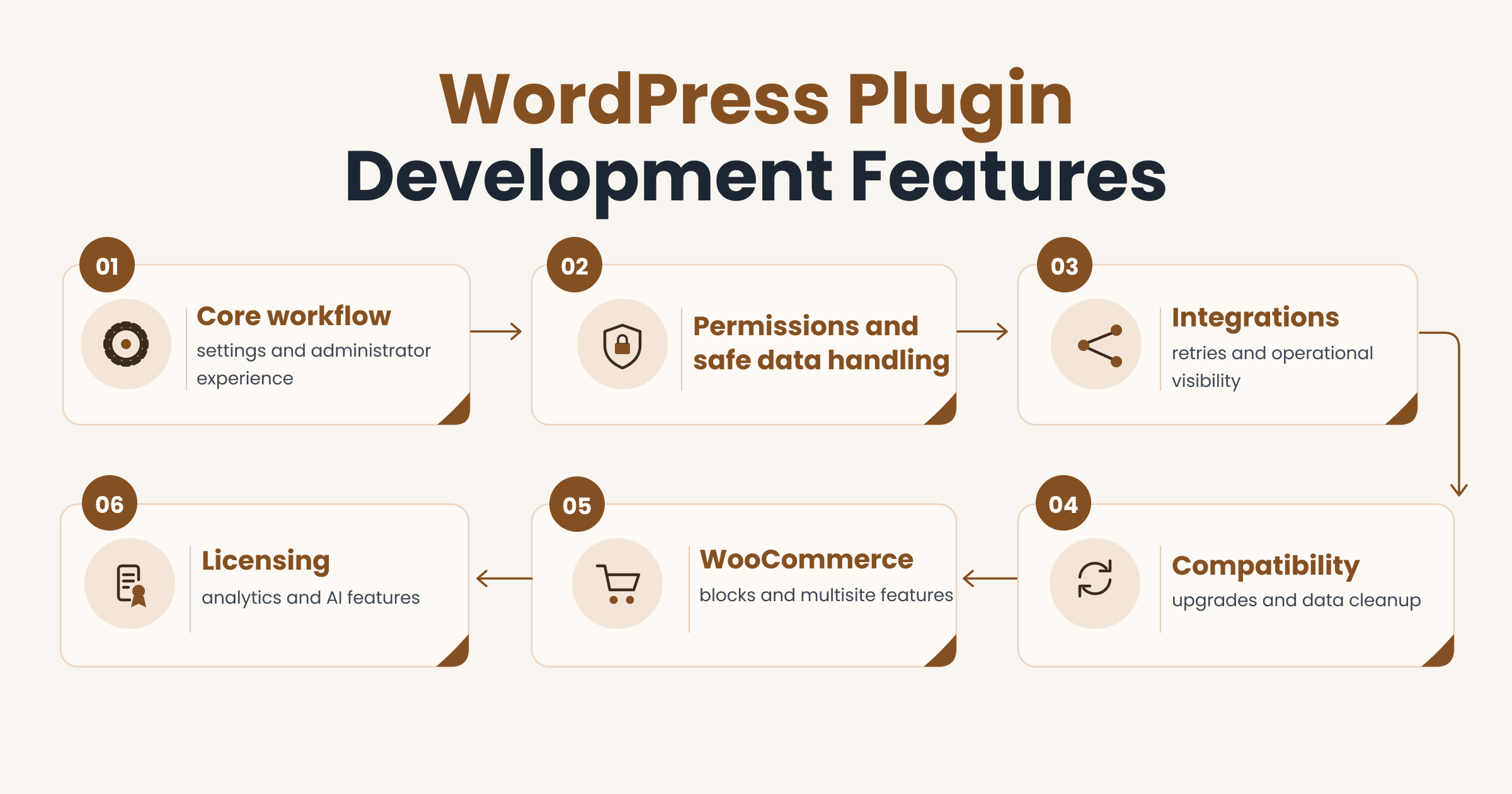
A first release should complete one useful workflow and make its failures understandable. Everything else can wait for version two.
The baseline example in this guide is a private lead-to-CRM connector with a small settings screen. A WooCommerce add-on or a public commercial plugin needs a different baseline. The same scope-first approach drives any MVP and SaaS development project, plugin or not.
The subsections below separate required features from model-dependent ones.
Core workflow, settings and administrator experience
An authorized operator should be able to configure and use the plugin without editing code. Settings belong in the admin interface, not in a constants file.
A minimal first release needs five things:
- Defined inputs, such as the form fields or order data the plugin reads
- Defined outputs, such as the record created in the external system
- Settings validation that rejects a malformed API key before saving
- Error states written in plain language, with the next step named
- A single settings screen built with the WordPress Settings API
Keep user-facing text translatable and keep controls reachable by keyboard. Avoid building a custom dashboard unless the workflow genuinely needs one. A standard settings page is cheaper to build and easier for your team to learn.
Permissions and safe data handling
Every sensitive action needs an appropriate permission check and careful input and output handling. Three controls carry most of the weight here.
Capability checks decide who may run an action. Validation and sanitization decide what data the plugin accepts. Escaping decides how data is printed back to the page. The WordPress security documentation sets out each one.
One point gets confused often. Nonces help protect a request from cross-site request forgery, a trick that makes a logged-in user submit an action without meaning to. A nonce is not an authorization check. You still need a capability test on the action itself.
Ask your developer for access tests that include lower-privilege users and direct API requests, not just an admin clicking through the screen.
Integrations, retries and operational visibility
An integration needs defined behavior when an external service is slow, unavailable or sends the same event twice. Those three cases cause most post-launch support tickets.
For the CRM connector example, agree the following before the build:
- Field mapping between the WordPress form and the CRM record
- Where credentials live and how they get rotated
- A queue or background job if the sync must not block the page
- A retry limit and a backoff delay, so a failing API is not hammered
- Duplicate prevention, usually through an idempotency key or a stored reference
- A diagnostic view showing recent syncs and their status
Keep secrets and personal data out of logs. Redact the payload and store an identifier instead. Also define how an operator resolves a failed sync, whether that means a retry button or a manual export.
Compatibility, upgrades and data cleanup
The plugin needs an explicit supported environment and predictable lifecycle behavior. No team can promise that a plugin works with every theme, plugin and host.
Declare the supported WordPress and PHP versions in writing. Name the themes, plugins and hosting configurations that were actually tested. Treat anything outside that list as untested rather than broken.
Deactivation and uninstall are different events. Deactivation should stop the plugin without touching stored data. Uninstall is where cleanup belongs, and the uninstall methods documentation explains the two supported approaches. Decide what gets deleted, and say so in the settings screen.
Schema migrations need the same care. Test the upgrade path on a copy of real staging data before any release reaches production.
WooCommerce, blocks and multisite features
Specialized features belong in scope only when the target workflow requires them. Each one adds its own testing matrix.
For commerce, test against actual checkout and order flows rather than a demo product. Extensions that read or write order data should follow the High-Performance Order Storage guidance, known as HPOS, where it applies to your store. Legacy order queries can break silently once HPOS is active.
For blocks, specify editor behavior and frontend output separately. A block that looks right in the editor can still render incorrectly on the live page.
For multisite, agree whether settings are per-site or network-wide, and which role may change them. Support for one of these three areas proves nothing about the other two. Ask for evidence in the area that matches your project.
Licensing, analytics and AI features
Commercial and advanced capabilities add their own operations and testing work. A private plugin may need none of them.
Software licensing and update delivery require infrastructure you then have to run. Product analytics should be opt-in and should collect the minimum needed to answer a real question. Neither belongs in a first release unless you are shipping a commercial product.
AI features need a validated purpose, a data-use review, output testing and usage-cost controls. A chatbot bolted onto a settings screen rarely survives contact with users. Our AI-powered applications and automation work starts from the task being automated, then checks whether a model is the right tool at all.
How does a company develop a WordPress plugin step by step?
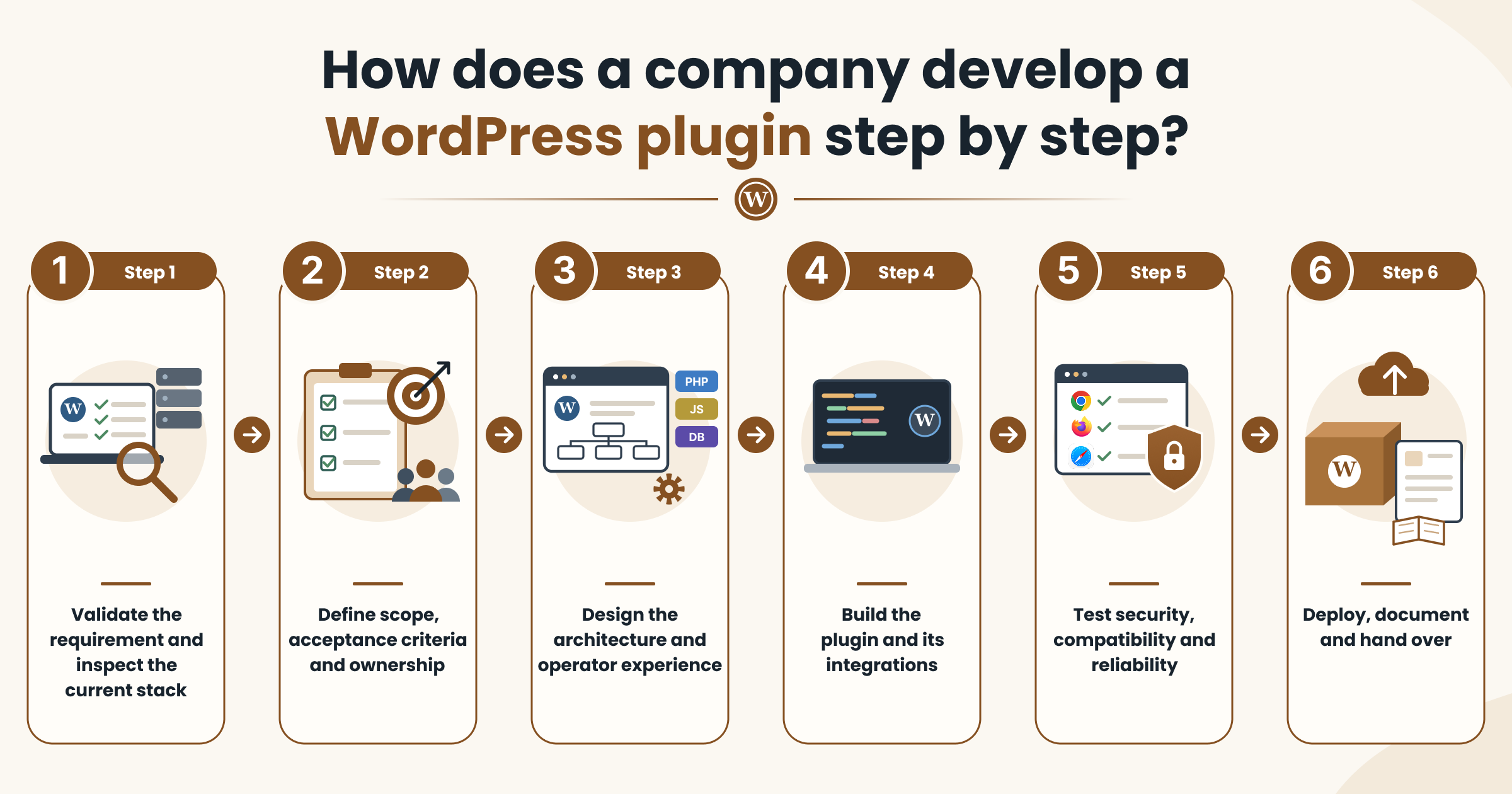
Build a small complete workflow, validate it, then expand the scope. The six stages below each produce a deliverable and a decision gate, so you always know what you are approving and why.
1. Validate the requirement and inspect the current stack
Start by confirming the business job and what the existing site already supports. A short audit prevents weeks of avoidable work.
Review the user roles involved, the active plugins, the WordPress and PHP versions, and the current data flows. Check whether an existing product or a supported hook already solves the problem. Request access to the integration documentation for any external service in scope.
Deliverable: a discovery summary. Gate: a justified approach, plus confirmed access to every system the plugin must talk to.
2. Define scope, acceptance criteria and ownership
Agree what the plugin must do and how completion will be demonstrated. Acceptance criteria turn opinions into tests.
Write both the core requirements and the failure-path requirements. List the supported environments, the explicit exclusions, the distribution plan and the responsibility boundaries. Agree a change-control method before the first line of code.
Deliverable: a prioritized scope and acceptance plan. Gate: buyer and provider agree on the evidence that counts as done.
3. Design the architecture and operator experience
Resolve data and interface decisions before committing to the full build. Rework at this stage costs hours, not weeks.
Map the hooks the plugin uses, the data model, the API permissions, the settings and the lifecycle behavior. Prototype the highest-risk flow first, usually the external integration or the most complex admin screen. Put the settings prototype in front of the person who will actually use it.
Deliverable: a design and a technical spike. Gate: feasibility and usability are demonstrated, not assumed.
4. Build the plugin and its integrations
Implement a testable end-to-end slice with maintainable code. One working path beats six half-finished features.
Use version control, code review and documented extension points so another team can pick the work up later. For integrations, prove authentication, field mapping and failure recovery early rather than at the end. Follow the WordPress coding standards so the code reads the way other WordPress developers expect.
Deliverable: a staging build. Gate: the core workflow meets the agreed acceptance criteria.
5. Test security, compatibility and reliability
Test realistic user roles, supported environments and failure conditions before release. Automated checks and manual review each catch different problems.
Cover failed API calls, duplicate webhook events, upgrades from the previous version and regressions on the existing site. Run user acceptance testing with the person who requested the feature. The Plugin Check tool helps with review, but a passing result is not a security certification or proof that the feature works.
Deliverable: a test report. Gate: every release blocker is resolved and recorded.
6. Deploy, document and hand over
Launch with a rollback plan and clear operational ownership. Take a backup, deploy to staging first, then roll out in a controlled way.
Handover should include the source code, build instructions, a settings guide, a change log and a named support route. Repeatable deployment matters more than a dramatic launch day, which is the same thinking behind our DevOps services.
Deliverable: an approved release and a handover pack. Gate: your team can operate the plugin and rebuild the same package from source.
What technology and architecture should the company use?
Technology choices should follow the workflow and the supported WordPress environment. A small plugin does not need every tool on this list.
| Component | Role | When you need it |
| PHP and WordPress APIs | Core plugin logic, hooks and filters | Every plugin |
| Settings API | Admin settings pages with validation | Any plugin with configurable options |
| REST API | Custom endpoints for apps or external systems | When another system must read or write data |
| JavaScript or React | Interactive admin screens and editor blocks | Only when the interface genuinely needs it |
| Post meta and options | Default storage for small amounts of data | Most plugins |
| Custom database tables | High-volume or oddly shaped data | Only with a reason and a migration plan |
| Background jobs | Work that must not block a page load | Bulk syncs, large imports, slow APIs |
| Test tools and build pipeline | Repeatable checks and packaged releases | Any plugin you intend to maintain |
Two decisions deserve pushback if a vendor proposes them casually. Custom tables mean you own the schema, the migrations and the cleanup. A React-heavy admin screen means a build step, a dependency tree and more maintenance than a standard settings page.
How should plugins connect to external APIs and SaaS products?
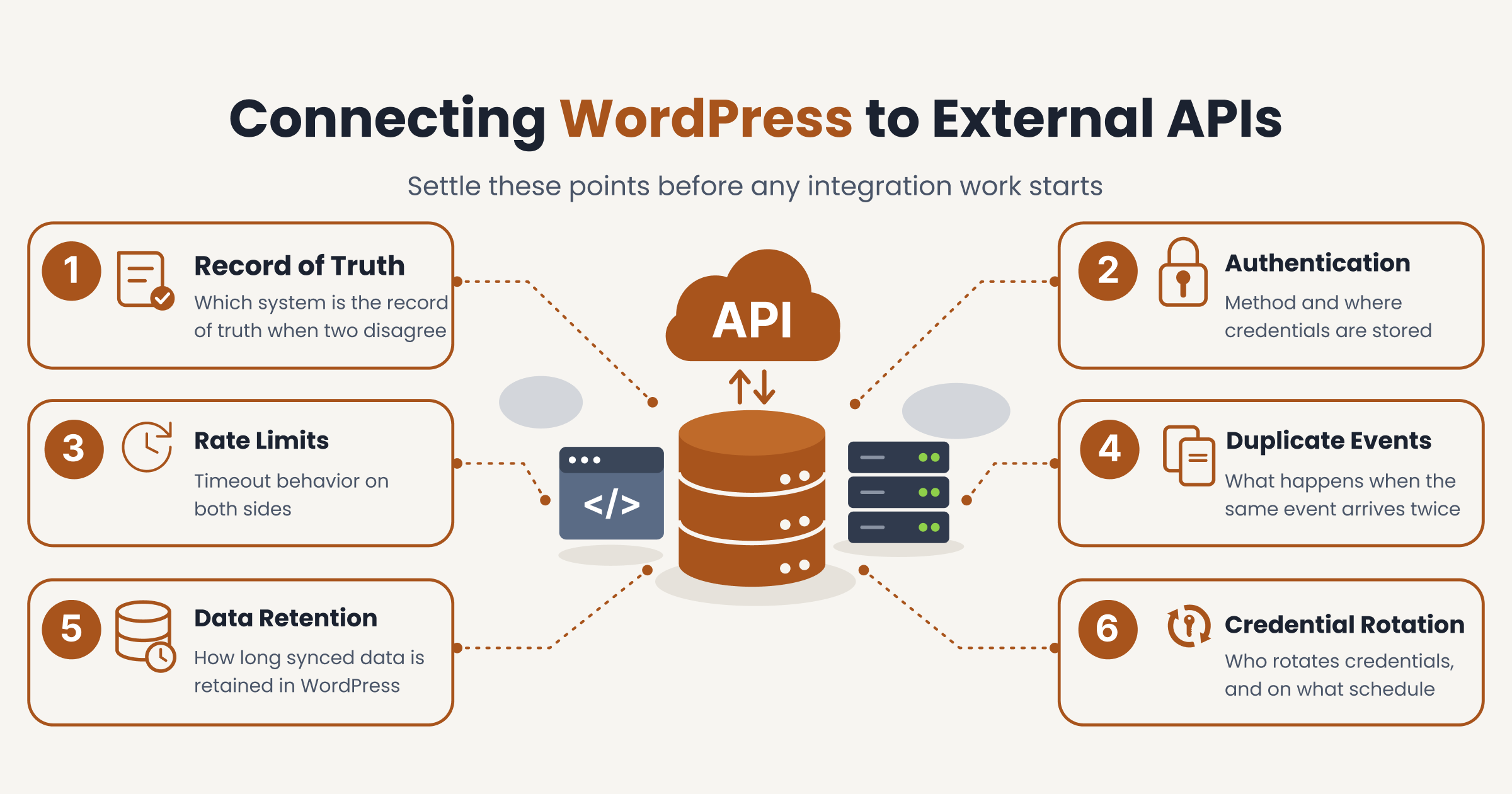
A REST endpoint, a webhook receiver and an outbound API client have different responsibilities. Mixing them up is a common source of silent data loss.
An outbound client sends data to a service your site does not control. A webhook receiver accepts data pushed to your site, often without warning. A custom REST route exposes your site’s data to something else, and every route needs a permission callback. The guidance on adding custom endpoints covers how those callbacks work.
Settle these points before any integration work starts:
- Which system is the record of truth when the two disagree
- The authentication method and where credentials are stored
- Rate limits and timeout behavior on both sides
- What happens when the same event arrives twice
- How long synced data is retained in WordPress
- Who rotates credentials, and on what schedule
Verify provider approval and access early. Some platforms require an application review before you can use production credentials. A fixed delivery commitment made before that approval is a commitment you may not control.
How much does a WordPress plugin development company charge?
A reliable quote depends on the agreed functionality, environment and delivery obligations. No published price list survives contact with a real scope document, and no verified price benchmark exists for this market.
The table below compares three scope scenarios rather than market price tiers.
| Scenario | What it usually includes | What drives the estimate |
| Narrow extension | One behavior added through existing hooks, minimal settings | Quality of the host plugin’s extension points |
| Integration-heavy plugin | External API, mapping, retries, logging, admin screen | Reliability and documentation of the external service |
| Distributed product | Licensing, update delivery, broad compatibility, support | Breadth of environments you promise to support |
Seven items make up most of any estimate: discovery, interface work, data modeling, integrations, quality assurance, documentation and release support. Ask for each to be priced separately. A single lump figure hides where the risk sits.
Ask every shortlisted provider to quote against the same scope document, in the same currency, with the quote date and exclusions stated. Comparing two quotes built on different assumptions tells you nothing useful.
What recurring costs belong in the budget?
A plugin needs an operating budget when dependencies, usage or distribution require ongoing work. Budget for the categories that apply to your model rather than a flat percentage of the build.
- Compatibility updates when WordPress, PHP or an integrated service changes
- Retesting after those updates, which is the real cost, not the patch itself
- External API fees that scale with usage
- Monitoring and error alerting
- Third-party licenses the plugin depends on
- End-user support, if people other than your team use it
- Update and licensing infrastructure, for commercial products only
Keep defect warranty separate from maintenance and from new feature work. Warranty covers bugs in what was delivered. Maintenance keeps it running. Features are a new scope and a new price.
How long does plugin development take?
A useful schedule follows the scope and its highest-risk dependencies. Treat any timeline quoted before discovery as a placeholder.
Three delivery types behave differently. A proof of concept validates one risky assumption and ends with a decision. A production private plugin adds acceptance testing, documentation and a handover. A public product adds broader compatibility testing and an external review you do not control.
Four things commonly move dates that have nothing to do with engineering speed: delayed API credentials, missing content or test data, slow approval cycles on your side, and third-party review queues. No provider can guarantee a WordPress.org approval date. Build slack around the dependencies you cannot control.
How will the plugin be distributed or monetized?
Distribution determines the update, support and packaging responsibilities you take on. Decide the model before the build, because it changes the architecture.
| Model | Update and support duty | Packaging and licensing notes |
| Private client install | Provider or in-house team updates a known set of sites | Terms set in the development agreement |
| Commercial distribution | You run update delivery and customer support | Licensing covers service access, not the GPL code itself |
| WordPress.org directory | Updates flow through the directory, support through its forums | Directory guidelines apply in full |
One distinction trips up new product owners. Under WordPress licensing, you generally sell support, updates and access to an external service rather than the right to use the code. Treating a plugin as a product rather than a one-off build changes how you plan roadmaps and pricing, which is covered in our guide on what product development is. Detailed legal interpretation belongs with a qualified reviewer, not a development team.
What changes if you publish on WordPress.org?
Directory publication introduces requirements beyond a private client delivery. Those rules apply to the directory channel only, not to every plugin you commission.
The detailed plugin guidelines set the current expectations. Code must be GPL-compatible and human-readable, with no obfuscation. Trialware is not permitted, and plugins that rely on an external paid service must offer a real service rather than an artificial lock.
Two assumptions to drop. A private client plugin does not need directory approval at all. And acceptance into the directory is a guidelines review, not a guarantee that the plugin is secure or bug-free.
What security, privacy and maintenance requirements matter?
Protect data and maintain compatibility throughout the plugin lifecycle. Three separate concerns get bundled together too often: engineering controls, distribution rules and jurisdiction-dependent legal obligations.
A custom build is not automatically secure, and a directory listing is not a compliance certificate. The two subsections below cover the practical side.
Minimize data collection and document access
Collect and retain only the information required for the agreed workflow. Every extra field is a field you now have to protect, export and delete.
Start with a short data map. List what the plugin stores in WordPress, what it sends to external services, and how long each item is kept. Redact personal data and secrets from operational logs.
The plugin privacy documentation covers export and erasure hooks, plus the privacy-policy text your developer should supply. Using those tools is good practice. They do not establish blanket GDPR compliance on their own, and your legal position depends on your jurisdiction and your data.
Plan compatibility updates and a clean exit
Agree who responds when WordPress, PHP or an integrated service changes. Name a person or a team, not a department.
A workable maintenance arrangement covers security patching, the list of supported versions, periodic dependency reviews and retesting after each change. Set a review cadence that matches your risk, not an arbitrary monthly ticket.
Plan the exit at the same time. You should hold the source repository, the release artifacts, the documentation and the ownership of any service accounts. Agree a data migration path too.
One detail saves real pain later. Specify exactly what uninstall deletes, so a temporary deactivation never wipes records your team still needs.
How do you choose a WordPress plugin development company?
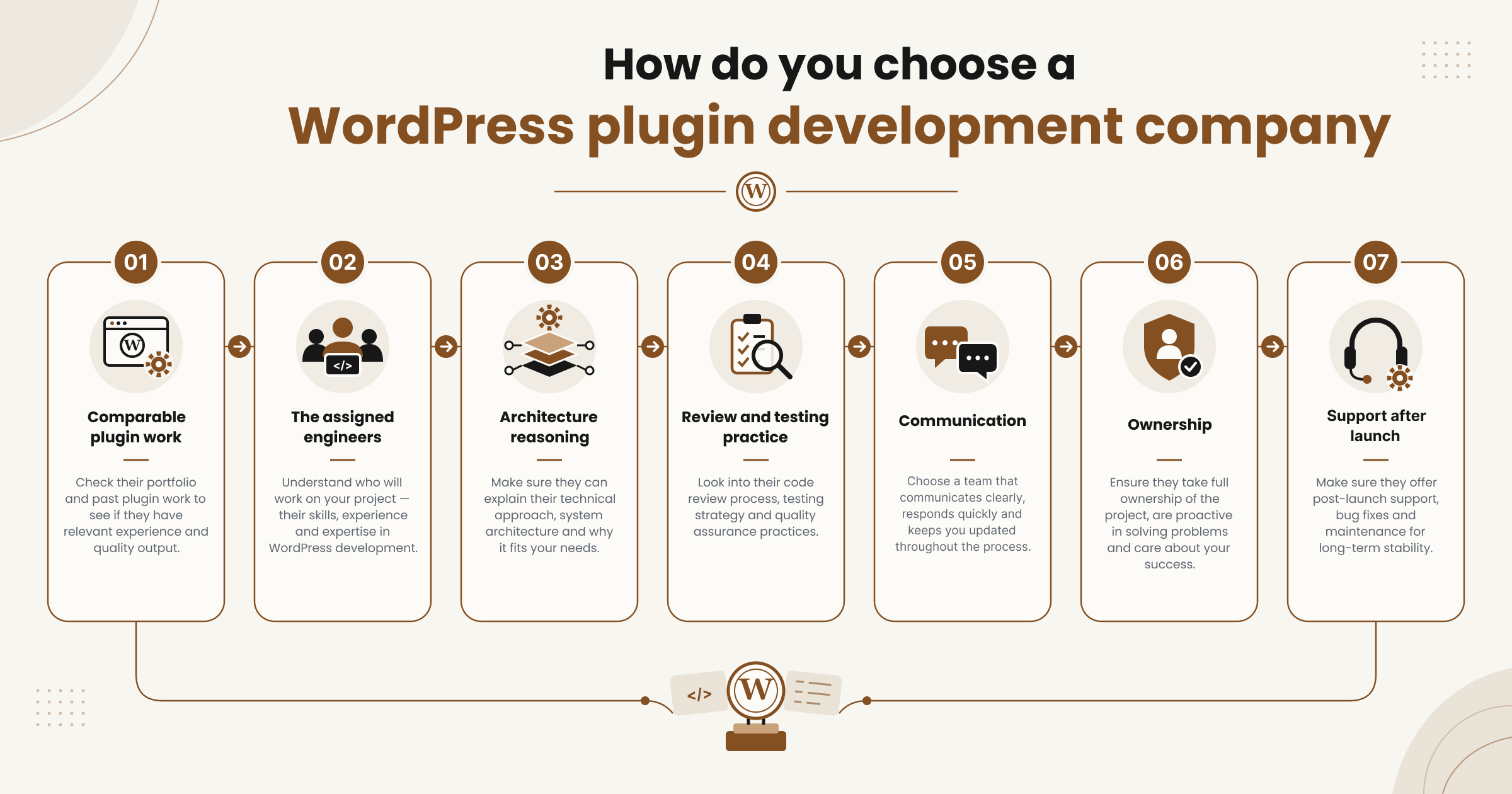
Choose a team that can prove relevant plugin work and explain how it will maintain your specific scope. Marketing pages all look similar, so test the claims directly.
Work through seven checks:
- Comparable plugin work. Ask for projects with similar integration or commerce complexity, not just similar industries.
- The assigned engineers. Find out who writes the code and whether subcontractors are involved.
- Architecture reasoning. A good team explains why it chose post meta over a custom table, in plain terms.
- Review and testing practice. Ask what gets code-reviewed, what is automated and what is tested manually.
- Communication. Agree the update cadence, the demo schedule and the escalation route.
- Ownership. Confirm who holds the source, the licenses and the service accounts on day one.
- Support after launch. Separate warranty, maintenance and new features in writing.
Three requests separate strong teams from polished sales decks. Ask for an anonymized walk-through of real plugin code. Ask for evidence of a release, such as a change log or a test report. Ask for one reference on a comparable project. A website design portfolio alone proves nothing about plugin engineering, which is why the CodersBucket case studies describe the technical problem rather than the visual result.
What should you ask for in a proposal?
Compare proposals against the same deliverables and assumptions. Send every provider one scope document, then ask each to respond to the same eight points.
| Request | Evidence to look for |
| Scope and exclusions | A written list of what is not included |
| Environment matrix | Named WordPress, PHP, theme and plugin versions |
| Acceptance tests | Specific, checkable statements per feature |
| Milestones | Deliverables tied to payments |
| Change control | A defined method for handling new requests |
| Source and licensing | Who owns what, and under which terms |
| Post-launch duties | Warranty period, response expectations, maintenance scope |
| Team composition | Named roles and any subcontracted work |
State currency and quote date for every figure. Agencies reselling development to their own clients should also confirm the confidentiality and branding terms, which CodersBucket handles through agency partnership and white label arrangements.
Frequently asked questions
Can a company customize an existing WordPress plugin?
Yes, when the existing plugin exposes suitable extension points and the licensing and maintenance arrangements allow the planned work. The safest route is an add-on plugin built on published hooks. Direct edits to the plugin’s files get lost on the next update. A fork gives you full control and full maintenance responsibility.
Will a custom plugin work with every theme and plugin?
No provider can assume compatibility with every possible site configuration. Ask for a defined supported environment and testing against your actual stack, including your theme and active plugins. Future third-party updates can still cause conflicts. That is a maintenance question, not a defect in the original build.
Do I need a company or a freelance plugin developer?
Choose according to coordination needs, scope, continuity and your internal technical capacity. A narrow task may suit a specialist working alone. Broader work often needs several roles, including quality assurance and project management. Neither model guarantees better code. The CodersBucket offshore development team model sits between the two, with named engineers working as part of your team.
Will I receive the source code and documentation?
The agreement should specify source delivery, repository access, licenses and documentation. Custom deliverables and third-party code or services are treated differently, so ask for both to be listed. Confirm that the team can reproduce the build from source. Avoid assuming exclusive ownership of everything without reading the terms.
Can I sell a plugin developed by an agency?
Commercial distribution can be planned, subject to the applicable rights, dependencies and channel rules. Agree product ownership, update delivery, support duties and distribution requirements before development starts. Paying for development does not automatically grant unrestricted proprietary rights. Dependencies carry their own licenses, which also affect what you can sell.
What information is needed to estimate my plugin?
Provide the business workflow, your existing stack, the integrations involved, the data you need stored and your release expectations. Sample inputs and outputs help most. Add the user roles, any known failure cases, your budget constraints and your distribution channel. The cost and scope sections above explain how those inputs change the estimate.
Plan your WordPress plugin project
Start with one defined workflow, a supported environment and an agreed acceptance plan. Scope discipline, tested delivery and clear ownership matter more than any feature list. Choosing a WordPress plugin development company gets easier once you know exactly what you are asking it to build. If you want to talk through your workflow, stack and integration needs with the CodersBucket team, contact us for a scoped discussion.