
Software product modernization improves a live product without breaking the users, data and revenue that depend on it. The right approach starts with a verified problem, not a new tech stack.
Sometimes that means a rewrite. More often, it means a targeted upgrade, a refactored module or one rebuilt workflow.
This guide is for CTOs, product leaders and software vendors running a product that customers already pay for. You’ll see when modernization is worth it and how to pick a strategy. You’ll also see what your first release should include.
Next comes a six-stage modernization roadmap. After that, we cover architecture, data migration, cost, ROI, launch planning and how to choose a partner.
Software Product Modernization at a Glance
A good modernization plan ties one product problem to a measurable outcome and a controlled transition. The table below shows the five decisions every plan needs, with one example answer for each.
| Decision | What to settle | Example answer |
| Business or user problem | Which verified problem justifies the change | Support staff take too long to find orders for customers |
| Current constraints | What blocks a fix today | Search logic sits inside a tightly coupled legacy module |
| Strategy | Which treatment fits this capability | Rebuild search and detail views, keep order writes in place |
| First migration slice | The smallest release that proves value | Read-only order search for one pilot customer group |
| Acceptance and ownership | Who signs off, and on what evidence | The product owner approves once task time and accuracy beat the baseline |
Each row maps to a later section of this guide, from strategy to process and cost.
What Is Software Product Modernization?
Software product modernization is the planned improvement of an existing product’s experience, architecture and delivery capabilities. The goal is a product that meets today’s user and business needs.
A product is more than its codebase. It has users, workflows, integrations, contracts and a roadmap that keep moving while you change it.
Scope can cover UX, code, data, infrastructure and operations. A product also doesn’t need to be very old to have constraints.
Say a three-year-old SaaS app outgrows its early database design. That’s a modernization problem too.
Modernization isn’t the same as patching, and it isn’t starting over. Routine patches keep the lights on without changing what the product can do. Building a brand-new product from a blank page is closer to classic product development.
How Does Product Modernization Differ from Maintenance and Cloud Migration?
Maintenance keeps a product running. Migration changes where it runs. Modernization changes what it can do or removes what holds it back.
These terms overlap in real projects. Treat the table below as a working guide, not a fixed industry standard.
| Type of work | Main goal | What usually changes | What can stay the same |
| Maintenance | Keep the product stable and secure | Bug fixes, patches and minor updates | Architecture, UX and hosting |
| UI redesign | Improve how the product looks and feels | Screens, navigation and design system | Backend logic and data |
| Application modernization | Remove technical or product constraints | Code structure, architecture, runtime and data | Core business behavior |
| Cloud migration | Move workloads to a new environment | Hosting, deployment and configuration | Product features and limits |
| Digital transformation | Change how the business operates | Processes, teams and many systems | Varies widely by organization |
A server move alone can leave every product limitation in place. On the other hand, a UI refresh can deliver real value without touching the backend. The label matters less than the problem you’re solving.
When Should You Modernize a Software Product?
Modernize when verified product or operational constraints justify the cost and disruption of change. A dated interface or an old framework isn’t enough on its own. You need evidence that the constraint hurts users, revenue or your team’s ability to ship.
A legacy software assessment turns hunches into evidence. The table below lists common modernization triggers, the evidence to collect and the business effect of each.
| Signal | Evidence to collect | Business effect |
| Slow release cycles | Time from commit to production and release frequency | Features reach customers late |
| Recurring incidents | Incident logs, root causes and repeat failures | Lost customer trust and on-call fatigue |
| Unsupported dependencies | End-of-support dates for runtimes, frameworks and libraries | Rising security and compliance exposure |
| Rising support effort | Ticket volume and handling time by feature | Support cost grows faster than revenue |
| Poor task completion | Usability tests, analytics and drop-off points | Lower adoption and higher churn |
| Integration limits | Partner requests you can’t fulfill and manual workarounds | Missed deals and partnerships |
| Scaling pressure | Load tests, peak latency and infrastructure cost per customer | Performance issues block growth |
Technical debt usually shows up across several of these signals at once. Slow releases and repeat incidents often share the same root cause.
Weak evidence is a valid result too. Retain the product as it is and monitor key metrics when the signals are thin. A clear “not yet” protects budget for the change that matters.
Which Modernization Strategy Fits Your Product?
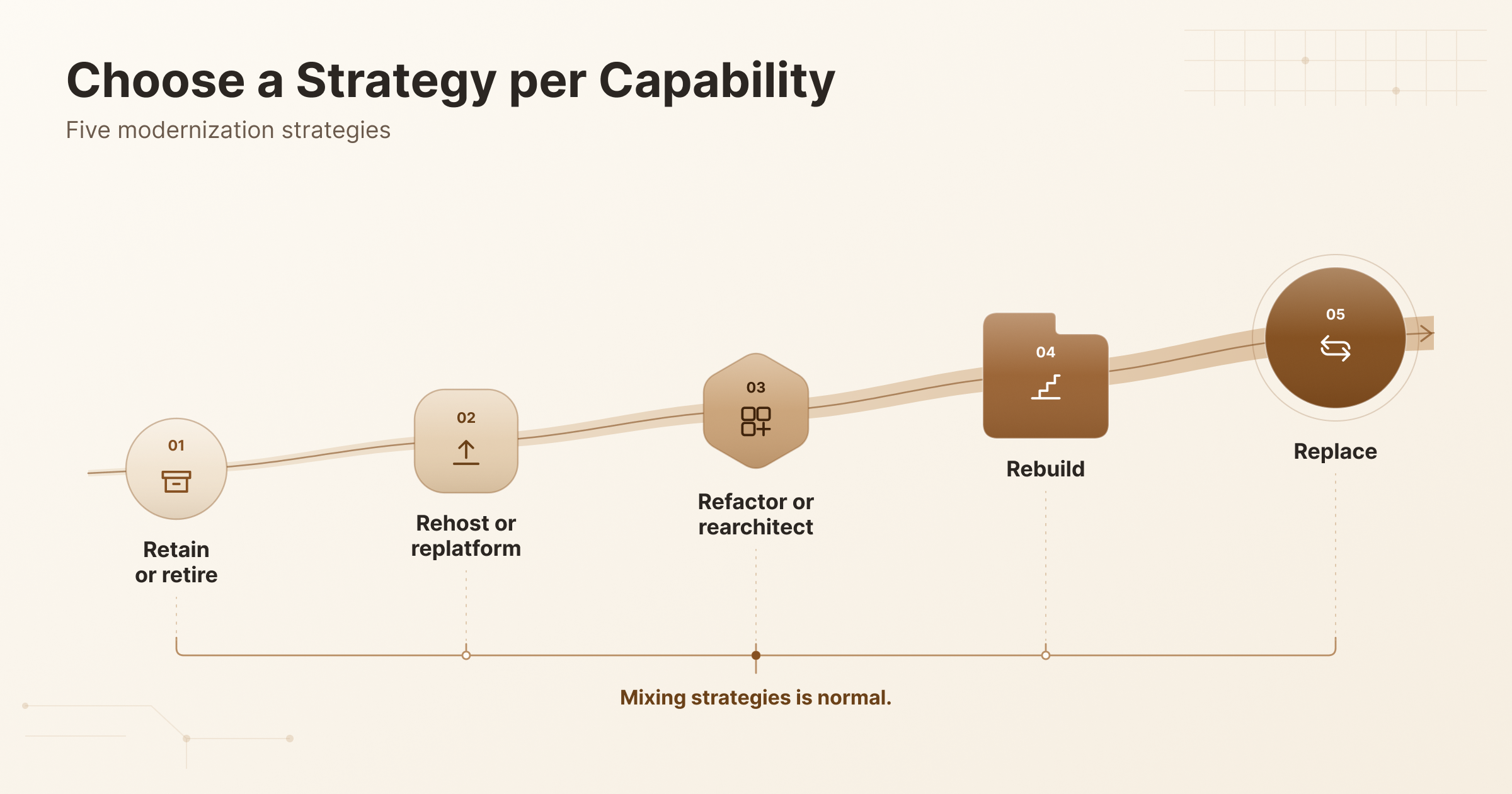
The best modernization strategy is chosen per capability, not forced across the whole product. One module might need a simple upgrade while another needs a full rebuild. Mixing strategies is normal.
Terminology varies across vendors and frameworks. The AWS migration strategies, often called the 7 Rs, are a useful cloud migration model. But they’re built for moving workloads, not for planning every product change.
Most product teams weigh five strategy families. The matrix below compares what each one changes, when it fits, what you keep and the main risk.
| Strategy | What changes | Best suited when | What you keep | Main risk |
| Retain or retire | Nothing, or the capability is removed | The feature works well or has little value | Everything, or nothing for retired features | Retiring something a hidden consumer still uses |
| Rehost or replatform | Hosting, runtime or managed services | Infrastructure is the main constraint | Most code and behavior | Product limits survive the move |
| Refactor or rearchitect | Code structure or system architecture | Behavior is sound but the structure blocks change | Business logic and data | Scope grows as hidden coupling surfaces |
| Rebuild | The capability is rewritten | Current code can’t support the target changes | Requirements and data, not code | Lost business rules and long parallel running |
| Replace | A commercial or SaaS product takes over | The capability isn’t a differentiator | Data and some integrations | Poor vendor fit, lock-in and migration effort |
For many products, the answer is a blend of two or three rows. You can see how CodersBucket approaches platform modernization for products that are already live.
Should You Refactor, Rearchitect or Rebuild?
Refactor when the current structure can support your goals. Rearchitect when it can’t. Rebuild only when little useful code is worth keeping.
Refactoring restructures code without changing its behavior. Rearchitecting changes how major parts fit together, such as splitting modules or moving data ownership. Rebuilding replaces the implementation with new code.
| Factor | Refactor | Rearchitect | Rebuild |
| Discovery effort | Low to moderate | Moderate to high | High |
| Behavior recovery | Mostly preserved in place | Verified at new boundaries | Rediscovered and retested |
| Coexistence with old code | Natural, same codebase | Needed during the transition | Long parallel running is common |
| Skills needed | Existing team knowledge | Architecture and migration skills | Domain and new-stack expertise |
| Feature delivery during work | Usually continues | Slows in affected areas | Often pauses or splits the team |
A rewrite doesn’t erase unknown business rules. It just moves them from old code into bugs you find later.
Here’s an illustrative example, not a real client case. A B2B order-management product has slow, confusing order search. The search code is tangled with pricing logic, so refactoring alone keeps stalling.
The team rearchitects search into its own module with a separate read model. Order creation and edits stay untouched in the legacy code, so the risky write paths don’t change yet.
When Does Incremental Modernization Make Sense?
Incremental modernization makes sense when old and new capabilities can run side by side behind one entry point. Each transition then covers a smaller scope.
The best-known approach is the Strangler Fig pattern. You place a routing layer, such as a proxy or API gateway, in front of the legacy product. Then you move capabilities one at a time and shift traffic as each one proves itself.
Users ──> Routing layer ──> Order search ────> New search module
└──> Everything else ─> Legacy product
Check these conditions before you commit:
- Interceptable boundaries: You can route requests for one capability without touching the rest.
- Integration access: The new code can reach the data and services it needs.
- Dual operation: Your team can run, monitor and support both systems for a while.
The approach has real costs. Adapters and routing add temporary code that someone must maintain.
For a small, well-understood product, one complete replacement can be simpler. Incremental delivery shrinks each change, but it doesn’t make delivery risk-free or guarantee zero downtime.
What Should the First Modernization Release Include?
The first modernization release should improve one meaningful workflow and prove the transition can be controlled. Teams often call this a pilot release or vertical slice. It cuts through UX, code, data and operations for one narrow job.
In the illustrative order-management product, the pilot modernizes order search and detail views for one customer cohort. Existing write paths stay authoritative, so order creation and edits still happen in the legacy system.
A read-only scope removes the hardest write-transition problems. It still needs permission checks and a clear rule for data freshness.
Other products need different priorities. A regulated or highly transactional product may need security or data work first. Sort your scope into three groups:
- Baseline: Behavior inventory, workflow redesign, access control, regression tests, observability and support readiness.
- Conditional: Migration rehearsal, change data capture, incremental routing and runtime upgrades.
- Later: Microservices extraction, SaaS billing and customer-facing AI, unless they’re core to the validated scope.
Critical Workflows and Business-Rule Coverage
Identify the behavior that users and downstream systems rely on before you replace any of it. Use this checklist to capture them:
- Key user journeys: Map each one and get approved examples.
- Hidden business rules: Capture them through code review and expert walkthroughs.
- Scheduled jobs: List every batch job, report and nightly process.
- Integration consumers: Record who calls your APIs, reads your files or receives your webhooks.
Characterization tests help here. They record what the system does today, so you can check that new code matches.
Don’t preserve everything blindly, though. Some existing behavior is a defect or an obsolete feature. Decide explicitly what will change, and get sign-off from the people who own that workflow.
User Experience and Accessibility Improvements
Modernize the workflows that create measurable friction for users, not the screens that merely look old. Use task research, support tickets and analytics to pick your targets. Then improve what the evidence points to:
- Navigation that helps users find records and actions quickly.
- Responsive layouts that work across desktop, tablet and phone.
- Keyboard access and screen reader support, guided by WCAG accessibility standards.
- Clear error and empty states that tell users what to do next.
Plan for user adoption from the start. Even good changes disrupt habits, so offer training, release notes and familiar paths during the transition.
A design-system refresh needs evidence of user benefit. It also isn’t backend modernization, so don’t count it as progress on architecture goals.
Security, Identity and Tenant Boundaries
The modernized experience needs verified access boundaries and security controls that fit its data and workflows. Build these checks into your release criteria:
- Map identities, roles, entitlements and session handling between old and new code.
- Test denied access and cross-tenant requests, not just successful logins.
- Review vulnerable dependencies, secret storage and encryption in transit and at rest.
- Confirm audit logging for sensitive actions.
- Run a threat review specific to your product and deployment.
Hiding a button in the UI isn’t an authorization boundary. The server must enforce every access rule.
Replacing single sign-on is conditional. Do it only when the current setup blocks the target workflow. Also identify the privacy, retention and sector obligations that apply to your actual product.
Tests, Observability and Recovery
A pilot needs evidence that it works and a way to detect and recover from failures. Put these in place before real users arrive:
- Regression tests that cover representative business and integration scenarios.
- Baseline telemetry from the legacy product, so you can compare.
- Actionable alerts routed to a named owner.
- Runbooks for the most likely failures.
- Agreed stop criteria that halt expansion.
Treat data recovery separately from traffic rollback. Feature flags control who sees the new experience. But they can’t reverse incompatible database writes.
The launch section later in this guide covers rollout mechanics in more detail.
SaaS Conversion, Advanced Analytics and New AI Features
New business capabilities belong in scope only when they support the product’s validated direction. Each one adds product, data and operational work. The table compares four common additions.
| Capability | When it fits | Extra work it brings |
| Desktop-to-web or SaaS conversion | Customers need browser access or you’re moving to subscriptions | Hosting, onboarding, billing and a new support model |
| Multi-tenancy | You serve many customers from one deployment | Tenant isolation, entitlements and metering |
| Usage analytics | You need evidence for product decisions | Event design, privacy review and data pipelines |
| Customer-facing AI | A specific user task gains clear value | Data quality, evaluation, access controls and usage costs |
Preserve existing contracts and entitlements during any conversion. Customers on older plans still expect what they paid for.
None of these is a compulsory first-release feature. Our MVP and SaaS development page explains how CodersBucket approaches the SaaS model.
How Do You Modernize a Software Product Step by Step?
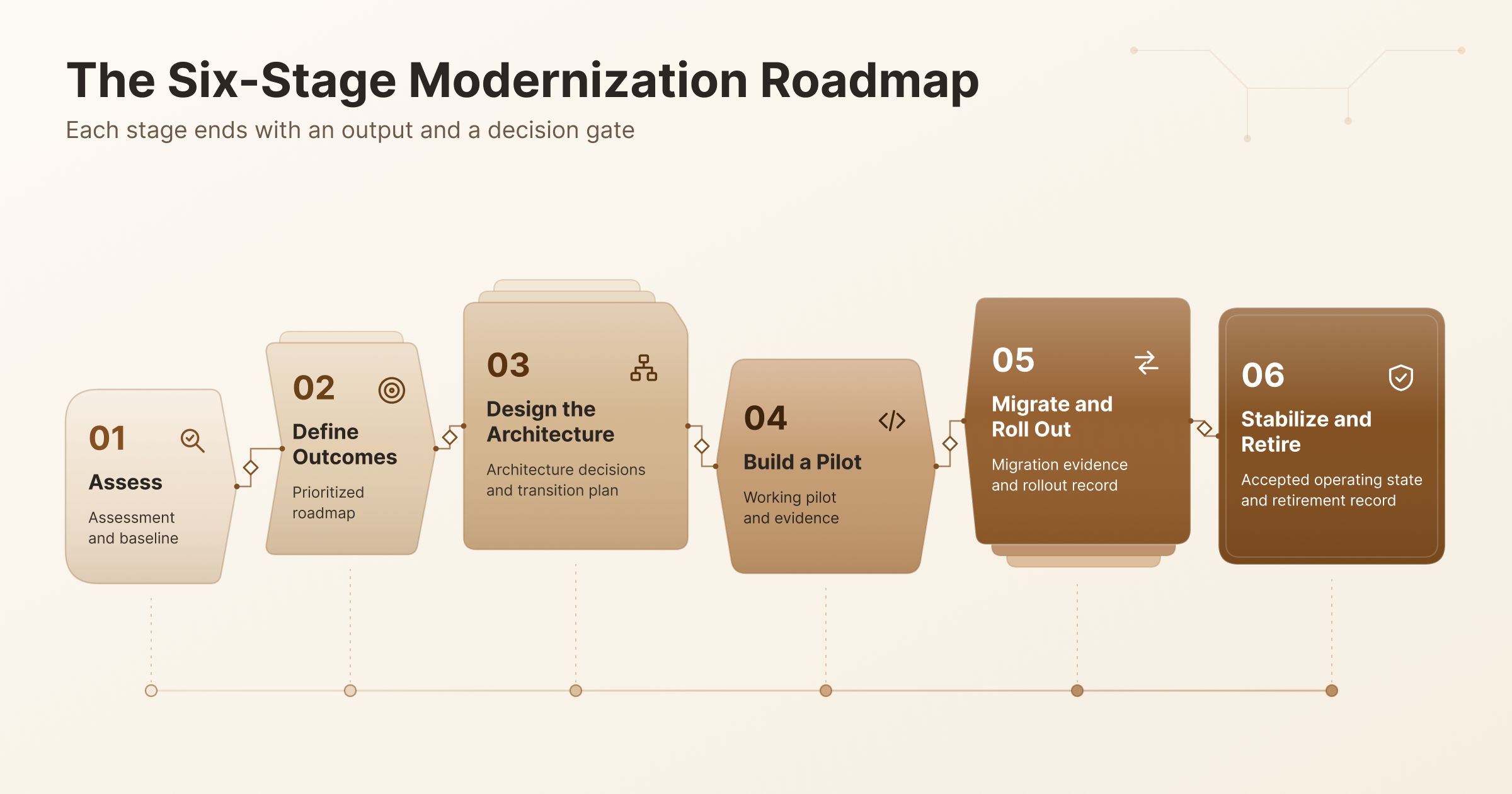
To modernize a software product, assess it, prove a first slice, then expand on evidence. The modernization roadmap below has six stages. Each stage ends with an output and a decision gate, and the cycle repeats for every new slice.
1. Assess the Product, Codebase and Dependencies
Start by building a shared view of how the product works and where it’s constrained. Combine user research with discovery across code, runtime, infrastructure, data and integrations.
Run a code audit and a dependency inventory that lists supported versions and licenses. Note knowledge gaps too, such as modules only one engineer understands.
Automated scanners help, but they can’t replace people who know why the product behaves as it does.
Output and gate: An assessment and baseline. Move on once important workflows and unknowns are visible to everyone.
2. Define Outcomes and Prioritize the Roadmap
Agree on outcomes before you choose the technical transformation. Name an owner for each outcome, record baseline metrics and define the evidence that proves success.
List scope exclusions and dependencies, so nobody assumes work that isn’t planned. Then rank candidate slices by user value, risk and feasibility.
Keep retain and retire on the list. Not every part of the product deserves new investment.
Output and gate: A prioritized roadmap. Move on once sponsors agree on what success means.
3. Design the Target and Transition Architecture
Design how the product will run during the transition, not just after it. Specify module boundaries, data ownership, API contracts, identity, hosting and operational responsibilities.
The transition architecture shows which system owns each piece of data at every stage. Then test your riskiest assumption with a technical spike. That might be an integration nobody has touched in years or a tricky schema mapping.
Output and gate: Architecture decisions and a transition plan. Move on once key assumptions are demonstrated, not just argued.
4. Build and Validate a Pilot Release
Deliver one end-to-end improvement to a controlled cohort before widening the change. Build the first slice with its UX, automated checks and telemetry in place.
Use feature flags to limit exposure to the pilot group. Then compare required behavior and user outcomes against the baseline. In the order-management example, order writes still stay in the existing system.
Output and gate: A working pilot and its evidence. Move on once acceptance and support-readiness criteria pass.
5. Migrate Data and Roll Out in Controlled Stages
Expand only after migration rehearsals and operational checks support the move. Sequence customer cohorts and dependencies, verify data mappings and rehearse cutover in a production-like environment.
Changed write paths need extra care. Name the system of record and decide how writes are handled during recovery.
Output and gate: Migration evidence and a rollout record. Move on once reconciliation results and stop/go criteria are accepted. The data and launch sections below go deeper.
6. Stabilize, Measure and Retire Legacy Components
Finish each migration by validating outcomes and removing the old dependency when it’s safe. Monitor production, support adoption and check business metrics over a defined period.
Before legacy decommissioning, confirm downstream consumers, retention needs, contracts and access. Temporary adapters need owners and removal criteria. Otherwise, they quietly become permanent.
Output and gate: An accepted operating state and a retirement record. The cycle closes once owners approve.
What Architecture and Technology Should You Choose?
Choose architecture and technology around your product’s constraints and your team’s ability to operate it. No single modernization tech stack fits every product. Weigh skills, portability, vendor support and lifecycle cost, not what’s popular this year.
The table maps each product layer to the decision you need to make.
| Component | Decision to make | Options to compare |
| UI and runtime | Can the current framework move to a supported version? | Supported upgrade or a new frontend framework |
| Domain code | Where are the natural module boundaries? | Modular monolith or selected services |
| Databases | Does the data model fit target workflows and scale? | Schema upgrade, managed database or a new store for one domain |
| Integration | How do other systems connect now and later? | REST or GraphQL APIs, events and adapters |
| Deployment | How often and how safely can you release? | CI/CD pipelines, containers and managed platforms |
| Monitoring | Can you see failures before customers do? | Logs, metrics, traces and alerting |
Cloud native designs, Kubernetes, serverless and event-driven systems are all conditional choices. Kubernetes suits teams that need fine-grained container control and can run it well. Serverless suits spiky workloads built from small, independent functions.
Deployment and monitoring also decide whether a modern stack actually ships faster.
That’s where DevOps services like CI/CD pipelines and infrastructure automation earn their place.
Do You Need Microservices or a Modular Monolith?
You need microservices only when independent ownership, deployment or scaling justifies their operational cost. A modular monolith keeps one deployable application but enforces clear internal boundaries. Microservices split capabilities into separately deployed services that talk over the network.
The table compares the two on the trade-offs that matter most.
| Factor | Modular monolith | Selected service extraction |
| Deployment | One unit with simpler pipelines | Independent releases per service |
| Data consistency | Local transactions | Eventual consistency or cross-service coordination |
| Testing | Simpler end-to-end tests | Contract and integration tests across services |
| Latency | In-process calls | Network calls add latency and new failure modes |
| Operational maturity | Standard monitoring | Tracing, service discovery and per-service on-call |
| Best fit | Teams sharing one codebase and release cadence | Parts with distinct scaling or ownership needs |
A monolith isn’t automatically legacy. And microservices don’t guarantee agility. Start modular, then extract a service when a real deployment or scaling need appears.
How Do You Migrate Data and Integrations Safely?
A data migration is complete only when the new system preserves what the data means. Row counts alone aren’t proof. Use this checklist for database modernization and integration moves:
- Inventory schemas, IDs, relationships, business rules, consumers and retention needs.
- Define schema mapping for every field, including defaults and transformations.
- Plan the backfill of historical data.
- Add change data capture, or CDC, if the old system keeps taking writes during coexistence. CDC streams database changes to the new store as they happen.
- Reconcile results with key totals, sampled records and domain invariants.
- Assign a named owner for cutover and sign-off.
Counts can match perfectly while the data is still wrong. Two tables can agree row for row while every price is off by a rounding rule.
Automated migration tools help, but they have coverage and performance limits. Test them on representative data before you trust their results.
In the order-management example, the pilot copies orders into a read model for search. The team checks order totals per customer, samples records and confirms every order still links to its account.
API Compatibility and Coexistence
Existing API consumers need a supported path while your interfaces change. Cover these points before any contract moves:
- Inventory public APIs, SDKs, webhooks and batch jobs, including undocumented consumers.
- Version your interfaces and publish deprecation notices with realistic timelines.
- Run contract tests that confirm each known consumer still works.
- Assign an owner to every adapter, including any anti-corruption layer.
An anti-corruption layer translates between old and new models. It keeps legacy quirks from leaking into new code.
Dual operation needs clear rules. Define which system owns each write, how much sync lag is acceptable and how conflicts get resolved.
Avoid casual dual writes. Writing to two systems at once fails in messy ways unless you’ve planned for partial failures and recovery.
Where Can AI Help with Software Product Modernization?
AI can help with bounded engineering tasks, as long as its output is checked against the real product. Keep two ideas apart. AI-assisted modernization speeds up engineering work, while adding AI features changes what the product does for users.
The table shows common AI-assisted tasks and how to validate each one.
| Use case | How AI helps | How to validate |
| Code discovery | Summarizes modules and traces dependencies | Confirm findings with engineers who know the code |
| Documentation | Drafts explanations of legacy logic | Have domain experts review inferred business rules |
| Test drafts | Generates candidate test cases | Review the tests and run them against known behavior |
| Code transformation | Suggests refactors or language upgrades | Human review plus passing characterization tests |
Review which code and data you expose to AI tools. Check each provider’s data-handling terms and limit tool permissions in your repositories.
Automated transformation doesn’t guarantee equivalent behavior. Treat every generated change like a pull request from a new team member.
Customer-facing AI is a separate product decision. Plan it as its own scope, much like dedicated AI-powered applications and automation work.
How Much Does Software Product Modernization Cost?
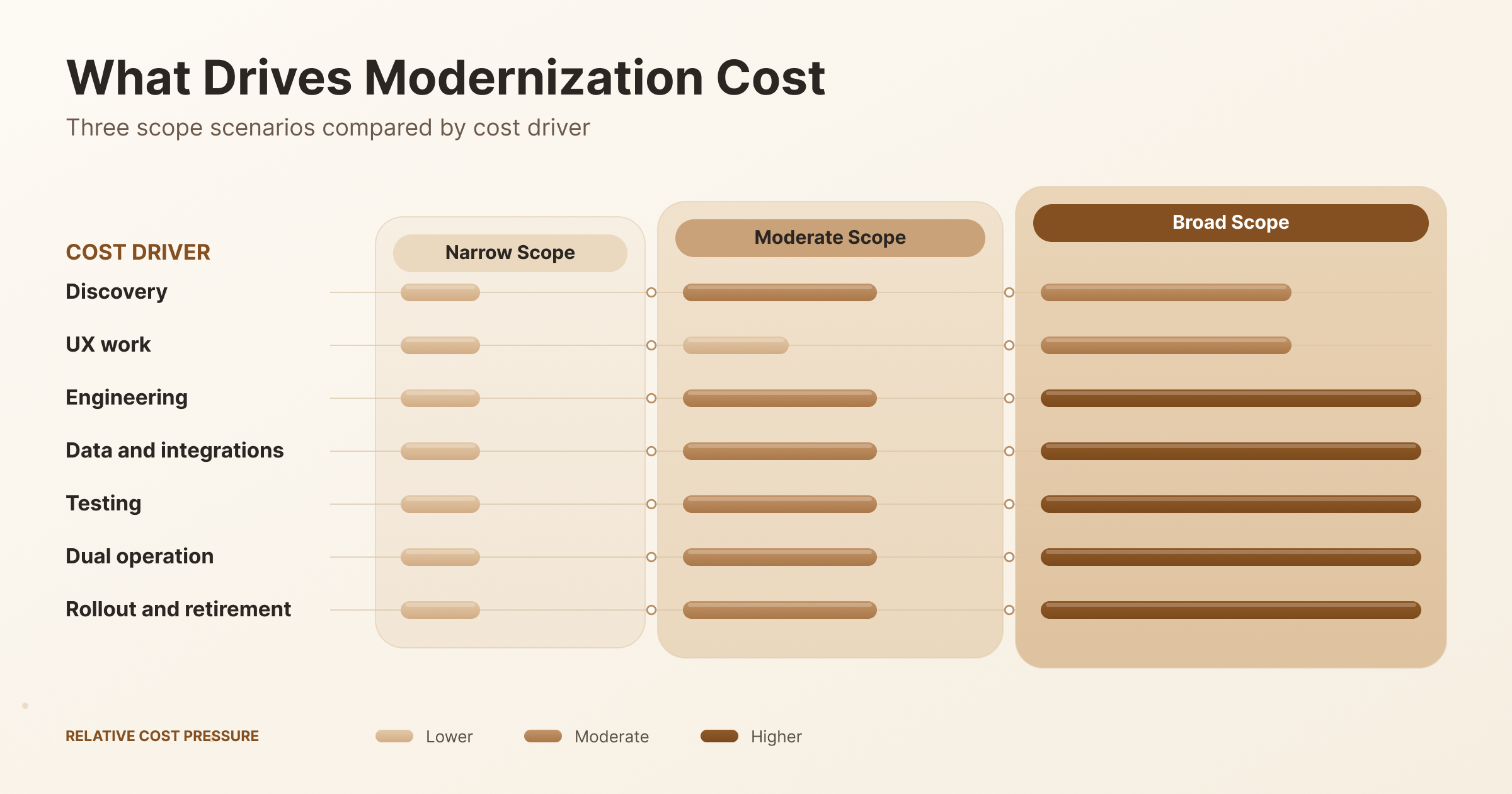
Software product modernization cost depends on your starting system, required outcomes and transition obligations. No reliable market range applies across products. A scoped estimate after discovery is the only defensible number.
The table compares three scope scenarios by the cost drivers each one carries.
| Cost driver | Supported runtime upgrade | Workflow-level replacement | Wider rearchitecture |
| Discovery | Light, focused on compatibility | Moderate, one workflow in depth | Heavy, across the product |
| UX work | Minimal | Moderate to significant | Significant |
| Engineering | Upgrade and fix breakages | New code for one capability | Many modules and boundaries |
| Data and integrations | Usually unchanged | Read model or partial migration | Full migration and contract changes |
| Testing | Regression suite | Regression plus characterization tests | Extensive testing across all consumers |
| Dual operation | Short or none | During the pilot and rollout | Extended, often across several waves |
| Rollout and retirement | Simple deployment | Cohort rollout and adapter removal | Multiple waves and decommissioning |
Hidden costs usually sit in dual operation and retirement. Running two systems means paying for hosting, monitoring and support twice for a while.
Ask for estimates that state scope, currency, date, assumptions and exclusions. Be wary of any firm quote given before anyone has looked at your code.
What Determines the Modernization Timeline?
Your modernization timeline depends on uncertainty, dependency order and how much change you can release at once.
Plan it as four phases: assessment, pilot, migration waves and retirement. Finishing the pilot isn’t finishing the program.
Several factors move dates:
- Data quality, since messy data slows mapping and reconciliation.
- Vendor approvals for licenses, APIs or hosting changes.
- User rollout pace, especially when customers need training.
- Internal availability of domain experts and decision makers.
Record estimate assumptions and give confidence ranges after discovery. Early timelines carry the most uncertainty, so revisit them at each gate.
How Do You Build the Business Case and Measure ROI?
Build the modernization business case by comparing the change with a realistic baseline of keeping the current product. Doing nothing has a cost too. The cost of inaction includes rising support effort, unsupported dependencies and lost deals.
A practical business case covers six areas:
- Support effort: Ticket volume and handling time tied to legacy issues.
- Hosting and licensing: Current infrastructure and license costs versus the target.
- Delivery capacity: Engineering time spent on workarounds instead of features.
- Task completion: How well users finish core workflows today.
- Retention: Churn linked to product limitations, where you can show the link.
- Commercial expansion: Deals, integrations or markets the current product can’t support.
Estimate benefits and total costs over the same period. Use total cost of ownership, including dual operation and the features you won’t build meanwhile.
Keep expected benefits separate from realized ones. Also avoid double-counting, such as claiming the same saved hours under both support and delivery.
Define ROI plainly if you show it: net benefit divided by total investment. Write down every assumption behind both numbers.
Which Product and Engineering Metrics Should You Track?
Track customer outcomes alongside reliability, delivery speed and operating cost. Product metrics show whether users benefit. Engineering metrics show whether your team can keep improving the product.
For delivery, use the five DORA metrics. DORA stands for DevOps Research and Assessment, and its measures appear in the table below.
| Metric | What it measures | Outcome it supports |
| Task completion rate | Share of users who finish a core workflow | Usability and product value |
| Product adoption | Active users of the modernized feature | Rollout success |
| Support tickets | Volume and themes per feature | Lower support cost |
| Latency and error rate | Response time and failed requests | Reliability |
| Unit cost | Infrastructure cost per customer, order or transaction | Operating efficiency |
| Change lead time | Time for a change to reach production | Delivery speed |
| Deployment frequency | How often you deploy | Delivery speed |
| Failed deployment recovery time | Time to recover from a failed deployment | Resilience |
| Change fail rate | Share of deployments needing urgent fixes | Release quality |
| Deployment rework rate | Share of unplanned deployments caused by incidents | Release quality |
Apply DORA metrics per application or service, not across the whole company. Set baselines and measurement windows before launch.
Skip generic improvement targets. Your own baseline is the benchmark that matters.
What Risks Can Derail Modernization?
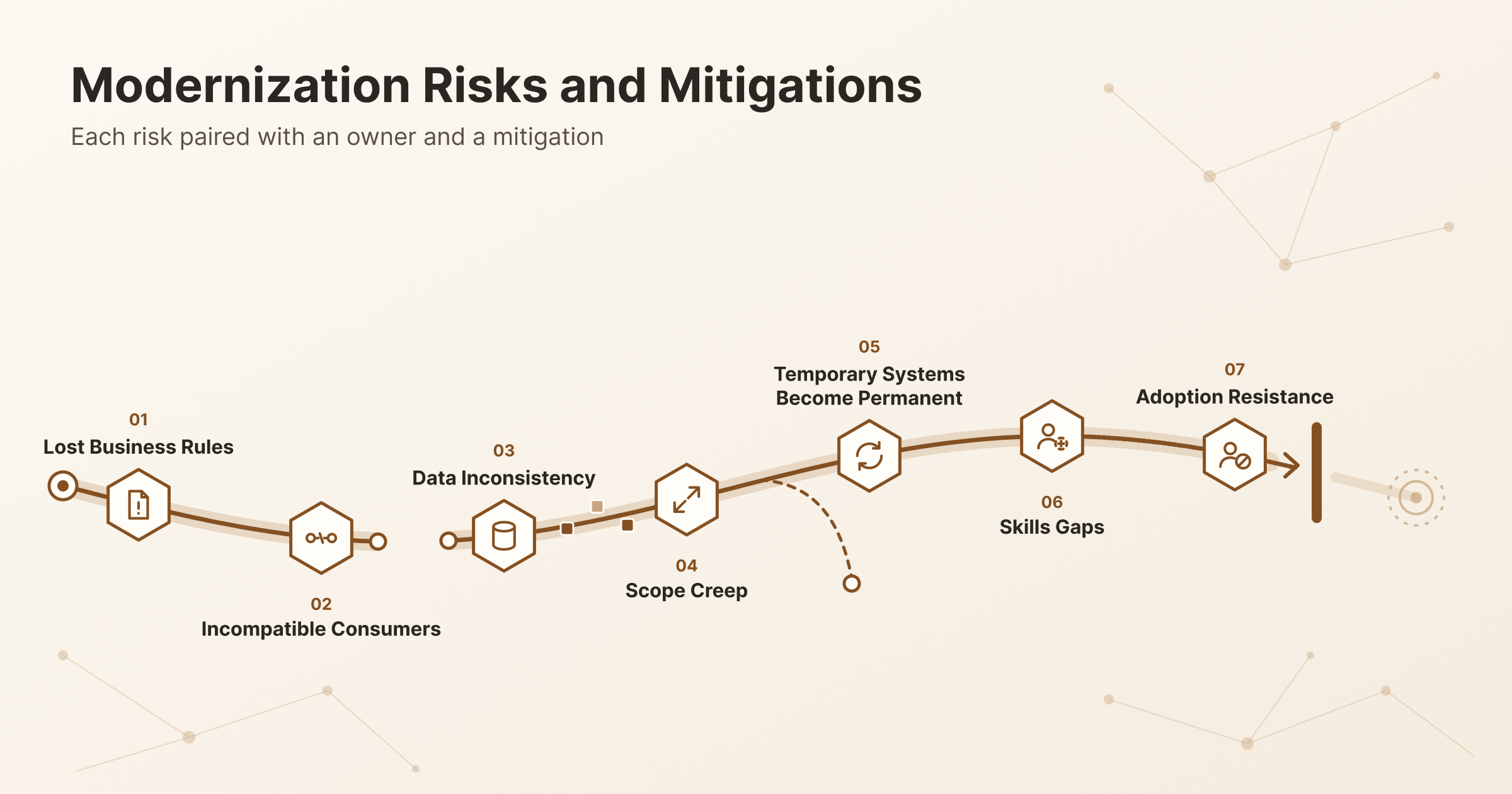
Hidden behavior, data errors and unmanaged transition work can sink an otherwise sound technical plan. Each risk below pairs early evidence with a responsible owner and a mitigation.
| Risk | Early evidence | Owner | Mitigation |
| Lost business rules | Unexplained edge cases in tests | Product owner | Characterization tests and expert walkthroughs |
| Incompatible consumers | Unknown callers in API logs | Integration lead | Consumer inventory and contract tests |
| Data inconsistency | Reconciliation mismatches | Data lead | Rehearsals, invariant checks and sign-off |
| Scope creep | New requests added mid-slice | Product sponsor | Written exclusions and gate reviews |
| Temporary systems become permanent | Adapters with no removal date | Engineering lead | An owner and removal criteria for every adapter |
| Skills gaps | Delays in unfamiliar parts of the stack | Engineering manager | Training, pairing or partner support |
| Adoption resistance | Low pilot usage and rising complaints | Customer success lead | Training, communication and feedback loops |
Keep cybersecurity and compliance work scoped to your actual product and deployment. Generic checklists miss real risks and waste effort on irrelevant ones.
How Do You Launch Without Losing Customer Trust?
Launch with a controlled rollout that pairs technical readiness with clear customer communication and support. Use this checklist for the cutover plan:
- Start with a pilot cohort that represents real usage.
- Use feature flags or a canary release. A canary sends a small share of traffic to the new version first.
- Run health checks and watch the alerts defined during the pilot.
- Rehearse migration and cutover before the real event.
- Agree on stop criteria that pause the rollout.
- Set up a support escalation path with named responders.
Document how recent writes will be reconciled if you need to recover. Traffic rollback sends users back to the old system, but it doesn’t restore data.
Communicate early. Send notices before changes, offer short training and confirm that plans and entitlements carry over.
Some changes need a maintenance window. Schedule it when usage is lowest and explain why. Zero downtime is a design goal, not a promise to make lightly.
What Happens After the Modernized Release?
Modernization continues after release through stabilization, ownership transfer and removal of obsolete components. Your support handover should cover:
- Support scope and response expectations.
- Runbooks for known failure modes.
- Patching schedules for runtimes and dependencies.
- Ownership of each service level objective, or SLO.
- Regular cost reviews.
- A technical debt backlog for the work that remains.
Retire infrastructure, licenses and adapters only after consumers and retention needs are resolved. Removing a legacy component too early can close your last recovery path.
Hand over repositories, deployment access and documented knowledge. Maintenance shouldn’t depend on one person.
How Do You Choose a Software Product Modernization Partner?
Choose a software product modernization partner that can explain transition risks and show evidence from comparable live-product work. Evaluate each candidate on seven areas:
- Discovery: Do they assess code, data and users before quoting?
- Product research: Do they talk to users, or only read code?
- Architecture: Can they explain trade-offs without pushing one stack?
- Data reconciliation: How do they prove migrated data is correct?
- Testing: Do they write characterization and contract tests?
- Phased delivery: Can they ship a pilot while the product stays live?
- Handover: What documentation and access do you get at the end?
Ask who will actually do the work. Find out how they’ll collaborate with your engineers, product owners and support staff.
Many US and Canadian companies add capacity with an offshore development team inside their existing process.
Request approved case evidence. Good examples describe the starting baseline, scope, outcome and what the partner can fairly take credit for. You can review CodersBucket’s case studies with those same questions in mind.
What Should a Modernization Proposal Include?
A useful modernization proposal makes assumptions, decisions and acceptance criteria visible. Check that each deliverable comes with matching evidence:
- Assessment outputs: Findings on code, data, dependencies and users.
- Prioritized roadmap: Ranked slices with outcomes and owners.
- Transition architecture: How old and new systems coexist.
- Migration scope: What data moves, when and how it’s verified.
- Test evidence: Which scenarios prove behavior is preserved.
- Milestone gates: What must be true before each next step.
- Roles and exclusions: Who does what, and what’s out of scope.
- Cost assumptions: The basis for every estimate.
- Support and exit terms: Post-launch support, handover and access to code.
Separate exploratory discovery from delivery commitments. A fixed delivery price before discovery usually hides assumptions you haven’t seen yet.
The CodersBucket team is happy to review a modernization proposal or roadmap with you before you sign anything.
Frequently Asked Questions
Can You Modernize a Product Without Rewriting It?
Yes. Targeted upgrades, refactoring and single-workflow replacement often meet the goal without a full rewrite.
The right intervention depends on your constraints and evidence. Use the strategy matrix above to match each capability to a treatment. Save rebuilding for parts that can’t support the changes you need.
Does Modernization Always Require Moving to the Cloud?
No. You can modernize a product on its current infrastructure when that meets your requirements. Cloud hosting is one option, with its own operational and cost implications.
Hosting location doesn’t decide product quality. A well-structured on-premises product can serve users better than a poorly designed cloud one.
Can Modernization Happen While Customers Keep Using the Product?
Often, yes. A phased transition can keep existing workflows available while new capabilities roll out to selected users.
Feasibility depends on separable boundaries, dependencies and your migration plan. Some changes, such as certain database cutovers, may still need a short, planned maintenance window.
What If the Legacy Product Has Little Documentation?
Start by reconstructing important behavior from code, runtime evidence and the people who know the product. Write representative tests and run discovery spikes before making large commitments. Label inferred business rules clearly, then confirm each one with stakeholders before you rely on it.
How Do You Decide What to Retire Instead of Modernize?
Retire a capability only after confirming low value, few dependencies and no blocking obligations. Check actual usage, downstream consumers, retained records and contract terms. Give customers who still need the data a migration or archive path, and announce the change early.
How Is Product Modernization Different from Adding AI?
Modernization fixes existing product constraints. AI is one possible new capability or an engineering aid.
Data readiness, AI-assisted delivery and a validated user-facing AI feature are separate decisions. Neither modernization nor AI is a prerequisite for the other.
Plan Your Software Product Modernization Roadmap
Start your software product modernization with one verified constraint, a measurable outcome and a controlled first release. Assess before you choose a strategy. Keep customers working while each slice proves itself.
When you’re ready to plan, share your product, current stack, main user problem and constraints. You can contact us to start a modernization assessment discussion with the CodersBucket team.